Softude
Building a web application takes six steps: planning, design, development, testing, launch, and maintenance. For most business applications the first five take 3 to 6 months and cost between $25,000 and $150,000, depending on scope and where the team is based.
This guide walks you through each step, how long it usually takes, who needs to be involved, and where projects tend to lose time and money. If you already know what you want built and need a team to build it, go straight to our web application development services.
What is Web Application Development?
Web application development involves designing, coding, testing, and deploying apps specifically built for web browsers and other devices.
If you’re wondering how to develop a web application, it requires creating interactive, responsive, and dynamic platforms that offer users a seamless experience. Web applications can serve various purposes, such as e-commerce platforms, social media sites, online banking systems, or productivity software, all benefiting from a well-constructed development process.
What are Various Types of Web Applications?
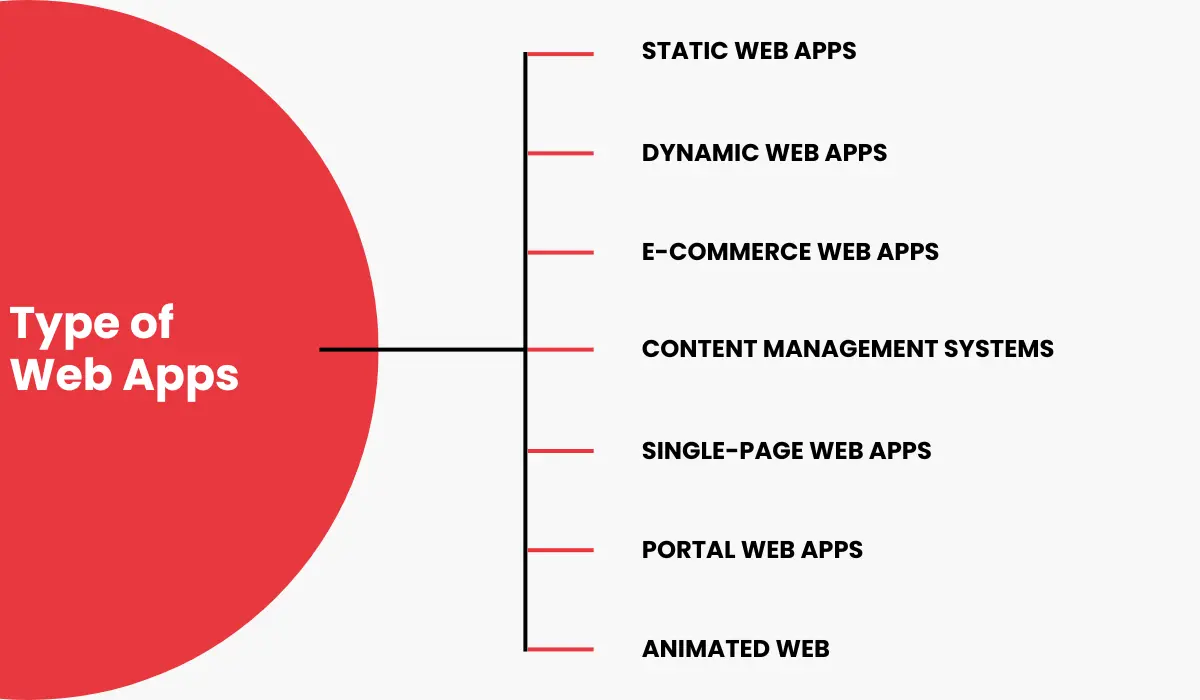
Knowing the different types of web applications can help you choose the right solution to meet your specific needs and goals.
- Static Web Applications: These basic applications, created with HTML and CSS, primarily display static content. While they offer design flexibility, they lack interactivity. Some web application examples include resumes in digital format as well as Lead capture websites.
- Dynamic Web Applications: Dynamic applications offer live data responding to the user’s requests, allowing for greater interaction and personalization. They rely on databases and are designed using languages such as PHP or ASP.NET.
- E-Commerce Web Applications: E-commerce platforms promote products and services directly to consumers and assist with tasks such as managing products and online payment. Some web application examples include Flipkart and Amazon.
- Single-Page Web Applications (SPA): SPAs work as a cohesive unit within a site, eliminating the need for page refreshes and delivering a fast, fluid user experience. Netflix and Twitter are web application examples of this.
- Portal Web Applications: Portals provide a central access point for particular users, allowing the creation of custom interfaces and monitoring of user activities.
- Content Management System (CMS) Web Applications: CMS platforms allow simple content modifications through admin panels that do not require technical knowledge. Some web application examples include WordPress, Joomla, and Drupal.
- Animated Web: These applications blend elements with animation effects to create greater visual appeal; however, they could challenge SEO optimization.
- Rich Internet Applications (RIAs): RIAs can emulate desktop applications within web browsers using plugins and provide users with interactivity. Upgrading plugins might cause compatibility problems.
Benefits of Web Application Development for Businesses
Web apps are gradually becoming more popular than traditional websites. Here’s why.
- Cross-Platform Compatibility
One of the greatest advantages of web applications is that they can be used with virtually every modern device. This includes laptops and desktop computers operating Windows, macOS, or Linux, mobile phones, and tablets with iOS or Android installed. When it comes to web applications, the OS of your device doesn’t matter.
- Wide Accessibility
If you are developing a web app, you do not need to worry about launching it to the app store and taking additional steps to meet its rules. On the other hand, users do not need to download apps, which can be challenging when using devices with small storage capacity or frequently updating the app to ensure it is functioning properly.
- Customization and Scalability
The flexibility of custom web development allows developers to make the necessary adjustments quickly without reworking the entire application structure. Furthermore, web applications are the best choice for those planning to expand their business within the next few years and looking for the most cost-effective approach.
- Lower Development Cost
The price of creating an application for the web might be higher than the costs of creating an existing website. However, it’s not comparable to the budget for creating a native application. Furthermore, native apps require constant maintenance and updates to stay in the game, whereas a website application is typically more durable.
- Improved Security
Traditional desktop or mobile applications store much of the users’ information, raising legitimate security concerns. If a device is lost or stolen, anyone can access private data that is not intended for the public. This is not an issue with web applications, as they store data safely on the cloud.
- Faster Development and Deployment
The frameworks and tools to develop web apps enable faster development times than native applications. This is an advantage for businesses that want to bring their products to market faster and respond swiftly to market changes.
- Integration with Third-Party Services
Developers benefit from this for improving app performance by connecting to numerous APIs, services, and third-party tools. This helps reduce the amount of time and effort required to develop.
- Consistent User Experience
Last but certainly not least, web apps provide a pleasant user experience while assisting businesses in establishing brand recognition. Regardless of their device, users will experience the same interface and features, which will help build loyalty.
Web Application Development Process: 6 Steps with Timeline and Cost
Developing a web app is not straightforward. A lot goes on behind the scenes, from planning to launch. Here is each step, how long it normally takes, who is involved, and the mistake we see most often at that stage. The timelines and budget shares below are typical for a mid-size custom build; small projects run shorter and complex platforms run longer.
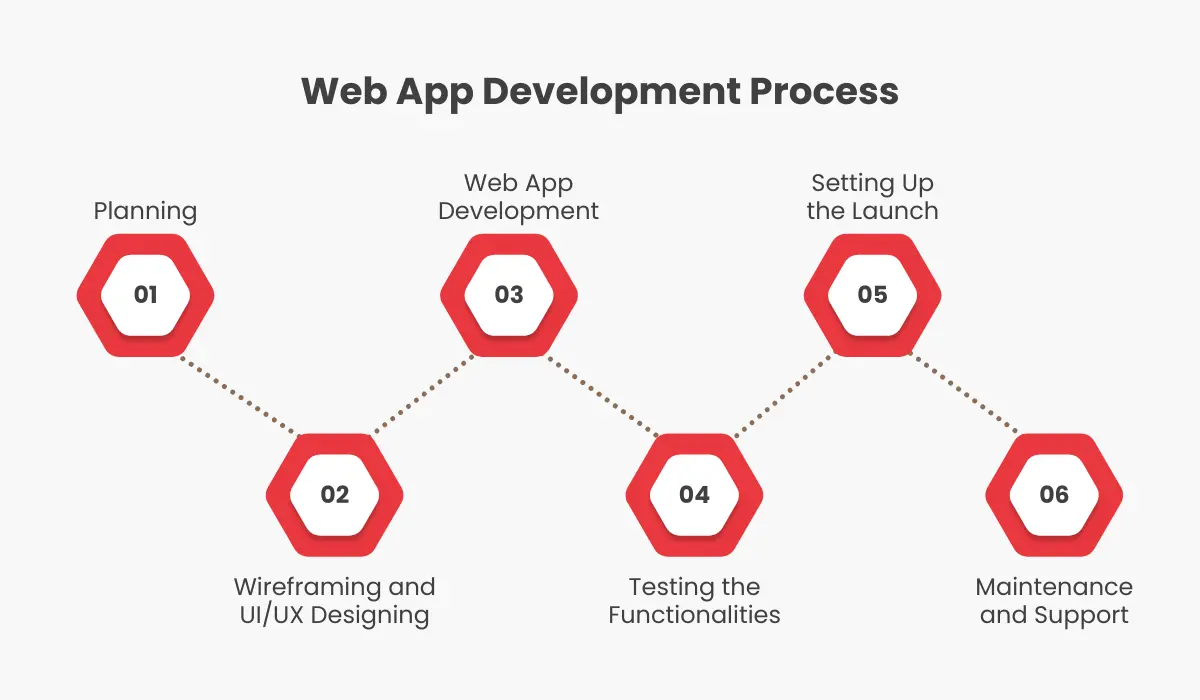
Step 1: Planning With Precision
The initial step to creating a web application is careful planning. This requires precisely defining the project’s scope, setting out clearly defined goals, determining the user, and then systematically recording the needs.
Conducting thorough market research and competitor analysis can provide valuable information that aids in developing an overall strategy.
- How long: 1 to 3 weeks
- Who is involved: product owner, business analyst, solution architect
- What you should have at the end: a written scope, user roles, a feature list, success metrics, and a tech stack decision
- Share of budget: 5 to 10 percent
- Where it goes wrong: skipping written specifications. Almost every change request later in the project traces back to a decision that was never written down here.
Step 2: Wireframing and UI/UX Designing
The next step is creating wireframes and the user interface (UI) and user experience (UX) for the web-based application. Wireframing helps you understand the layout and functions of every component and screen.
UI design is focused on visual and aesthetic aspects, creating a coherent and appealing interface. UX design is focused on the user’s overall experience and flow of interaction, seeking to facilitate intuitive navigation and a seamless experience. Iterative design, including feedback from stakeholders as well as usability tests, helps refine the UI/UX before any code is written.
- How long: 2 to 4 weeks
- Who is involved: UX designer, product owner
- What you should have at the end: a clickable prototype, a design system, and usability test results
- Share of budget: 10 to 15 percent
- Where it goes wrong: designing every screen before testing the first three. A clickable prototype tested with five users catches most navigation problems for a fraction of what it costs to fix them in code.
Step 3: Web App Development
The development phase starts by translating the design into a functional web-based application. It will take longer than any other stage. The choice of tech stack, the app’s complexity, and the number of features all affect the total duration.
To keep things moving, use agile methods where the entire project is divided into two-week sprints. With continuous integration and deployment (CI/CD), every sprint ends with working software in a staging environment that you can see and test. Your choice of frameworks matters here too, both for speed of development and for how easy the app is to maintain later.
- How long: 6 to 16 weeks
- Who is involved: front-end and back-end developers, DevOps engineer, project manager
- What you should have at the end: a working application on a staging server
- Share of budget: 50 to 60 percent
- Where it goes wrong: integrations with third-party or legacy systems. These routinely take two to three times the estimate when the other system’s API documentation is poor. Flag every integration in Step 1 and ask for the documentation before development starts.
Step 4: Testing the Functionalities
Testing is crucial to ensure your web application conforms to quality requirements and works as expected. This includes unit testing that checks specific modules, integration testing that checks how components work together, and user acceptance testing (UAT) that verifies the application against real users’ needs.
Performance testing assesses scalability and reliability under load. Security testing checks for the common vulnerabilities that attackers look for first.
- How long: runs alongside development, plus a final pass of 2 to 3 weeks
- Who is involved: QA engineers, then real users for acceptance testing
- What you should have at the end: unit, integration, performance and security test results, and user acceptance sign-off
- Share of budget: 10 to 15 percent
- Where it goes wrong: leaving performance and security testing to the end. Both can change the architecture if they fail, and architecture changes in week 14 cost weeks, not days.
Step 5: Setting up the Launch
Once you get the green flag after development and testing, prepare for the launch. This requires servers and domain settings, SSL, and the app installation in a production environment.
After launch, keep monitoring server performance and scalability to ensure the application handles traffic and user interactions smoothly.
- How long: about 1 week
- Who is involved: DevOps engineer, project manager
- What you should have at the end: a production environment, domain and SSL, monitoring and alerting, and a rollback plan
- Share of budget: under 5 percent
- Where it goes wrong: launching without monitoring. The first week in production is when the real load pattern shows up, and you want to see it before your users tell you about it.
Step 6: Maintenance and Support
Continuous maintenance and support are essential to ensure your app always performs well and remains secure. This means addressing issues as they come up, making feature enhancements, keeping dependencies updated, and patching security vulnerabilities.
Regular monitoring and analytics will help you find areas for improvement and opportunities to improve the user experience. Prompt support for your users’ queries keeps them from leaving and keeps the application up to date.
- How long: ongoing
- Who is involved: a part-time developer and a DevOps retainer
- Typical cost: 15 to 20 percent of the build cost per year
- Where it goes wrong: treating launch as the finish line. Dependency updates, security patches and user feedback need a named owner from day one, or they pile up until something breaks.
Top Examples of Web Applications in 2027

To help you comprehend how to create a complete web application, let’s examine a few real-world examples of web applications that have dominated the marketplace and have built a huge customer base.
- Trello
Trello is a visual project management application that streamlines task and team management. It utilizes lists, boards, and cards to offer a flexible task and project management platform. Teams can attach lists and files to their work and automate certain processes to boost efficiency. With its easy-to-use interface, Trello is gaining popularity for managing projects across various sectors.
- Airbnb
Airbnb is an established online marketplace that allows users to search for rentals and accommodation options across the globe. Airbnb allows hosts to rent their homes, ranging from private houses and flats to rental properties like tree houses. Visitors can browse various lodging options and rent apartments from local hosts. Airbnb has revolutionized how travelers travel, making finding suitable accommodation simpler and quicker.
Pinterest is a photo, virtual content-sharing platform that allows users to save and find ideas. It allows users to create boards and share photos or other content related to their preferences, including recipes, photos of celebrities, and interior design concepts. With its focus on images, Pinterest provides users with a unique platform to design and share their personal preferences and look over the myriad of innovative ideas posted by others.
- Alibaba
Alibaba is an e-commerce multi-service platform that offers online shopping, computing tools, digital media, and other products. It connects businesses to wholesalers, producers, and consumers. Alibaba’s platform allows B2B transactions, making it simple for businesses to search for products and services.
For a Softude-built example, see our personal financial management web app for a financial institution, built using the same six-step process described above.
Top Tools Developers Prefer for Web Application Development
Most modern web applications are built on a small set of proven frameworks. On the front end, React, Angular, Vue and Svelte are the common choices. On the back end, Node.js (often with NestJS), Django in Python, Laravel in PHP and .NET cover most business applications. Lighter options like HTMX suit simpler interfaces where a full front-end framework is more than you need.
Which one is right for your project depends on your team’s skills, the integrations you need, and how the app will grow. We compare them in detail, with the trade-offs of each, in our guide to front-end frameworks for web development.
1. React
2013 saw the launch of React, which Facebook developed to aid in the creation of more dynamic and user-friendly websites and web applications. Imagine it as an assortment of tools that allow developers to create web interfaces that work more efficiently. The best part about React is how it handles changes to web pages. It’s similar to an intelligent assistant that can tidy up the mess without causing chaos.
2. Angular
Angular is a powerful web application programming framework created and maintained by the Angular Team at Google. The framework is based on TypeScript, a subset of JavaScript that has allowed the creation of static writing and increased the usability of code.
3. SvelteJS
SvelteJS is a modern framework that revolutionizes building web applications with its innovative approach, offering a streamlined and efficient development process. Unlike traditional models, Svelte shifts the burden of working in the browser to the building process. Converting Svelte components into optimized JavaScript makes applications lighter and more efficient.
4. NestJS
NestJS is a server-side Node.js framework that simplifies building web applications by providing a structured, scalable architecture for creating robust and efficient apps. It was developed for enterprises requiring a strong, flexible, modular, and effective framework.
Inspired by Angular, it has a foundation built by the top Express. This scalable and flexible framework uses TypeScript to provide strong writing, decorators, and other capabilities to ensure robust Node.js development.
5. HTMX
HTMX is a convenient JavaScript library that embeds advanced technologies such as AJAX, CSS Transitions, WebSockets, and Server-Sent Events directly into HTML. Instead of juggling several applications, HTMX neatly integrates them using HTML attributes, making it a must-have for designing modern and sleek interfaces.
6. Django
Django is an open-source framework for web development that simplifies web development. It follows the Model-Template-Views (MTV) design pattern.
Django can be written using Python and focuses on fast development. It provides a high-level syntax that lets developers build easy-to-maintain and scalable web applications.
7. Laravel
Laravel is a PHP web framework developed to help developers create efficient web applications. It follows the Model-View-Controller (MVC) architectural pattern, which helps organize code and simplifies development.
Laravel is a reliable and feature-rich framework supported by a vibrant community and frequent updates. Its ecosystem comprises tools and packages that make it easier to complete the most common tasks, such as routing, authentication, and caching.
Due to its focus on high-performance development, Laravel is a popular choice for modern web app development. It provides a robust framework for building efficient and scalable applications.
8. VueJS
VueJS is an open-source JavaScript library for front-end development. It was developed to address some of the issues that plagued existing frameworks. Due to its simplicity and user-friendliness, it quickly gained popularity.
VueJS uses a model-view-model design, which is perfect for creating user interfaces and single-page applications. What makes Vue.js distinctive is its progressive nature.
Ballpark Estimate of Web Application Development Cost
What Web Application Development Costs
It isn’t easy to give a single number without knowing the exact specifications, but it is possible to give useful ranges. Cost depends on four things: how many features you need and how complex they are, the integrations required, the team’s location and seniority, and how much of the design and specification is done before development starts.
Typical ranges for a custom build in 2027:
- Simple web application: one user role, no complex integrations, standard design. $25,000 to $50,000, 3 to 4 months.
- Mid-complexity application: multiple user roles, payments or CRM integration, custom design, reporting. $50,000 to $150,000, 4 to 6 months.
- Complex platform: marketplace, multi-tenant SaaS, real-time features, or compliance requirements. $150,000 and up, 6 to 12 months.
A scoped first version to test the idea typically runs $15,000 to $50,000. Our guide on what determines MVP development cost breaks that down factor by factor.
Rates vary by team location and seniority, which is why the same scope can come back with three very different quotes. Watch for hidden costs too: monthly fees for themes, plugins, hosting and third-party APIs are easy to miss in a first estimate.
US businesses planning a mobile companion app alongside the web application should read our Android app development guide for the USA, which covers timelines and team models for US clients.
Get an Estimate for Your Web Application
If you have a scope in mind, we can turn it into a fixed-price estimate with a timeline by step. Book a 30-minute call with our team and bring whatever you have, even if it is a one-page list of features.
Frequently Asked Questions
How long does web application development take?
Three to six months for most business applications, from planning to launch. Simple applications with one user role can be done in three months. Platforms with real-time features or compliance requirements take six to twelve.
What is the difference between a website and a web application?
A website presents information. A web application lets users do something with data, such as log in, create records, run transactions or collaborate. Most business websites today include at least one web application, such as a customer portal.
Which step of the process takes the longest?
Development, at six to sixteen weeks. It is also where delays concentrate, usually because of third-party integrations that were underestimated during planning.
Do I need a native mobile app as well?
Not at the start. A responsive web application works on every device. Build a native app only when you need device features such as push notifications, offline use or camera access, or when your users spend most of their time on a phone.
What should be in a web application development quote?
A written scope, the tech stack, team composition with roles, a timeline by step, a fixed price or a rate card with an estimate, what is excluded, and the maintenance cost after launch. If any of those is missing, ask for it before comparing quotes.