Softude
Customer support used to be a headcount problem. Volume goes up, you hire more people. Simple enough, until it isn’t. Hiring takes time, training takes longer, and even a well-staffed team hits a wall the moment ticket queues pile up faster than agents can clear them.
That’s the situation a lot of businesses found themselves in, and it’s a big reason AI started getting serious attention in support operations. Not because it’s trendy, but because the math genuinely works out. Businesses running AI for customer support are handling more conversations with the same team size, cutting response times from hours to seconds, and doing it all without customers noticing any drop in quality, sometimes the opposite.
83% of service organizations already use AI in some capacity. That’s up from 56% just three years ago. At this point, it’s less about whether AI belongs in customer support and more about figuring out where to start and what actually works. That’s what this guide is for.
What is AI for Customer Support?
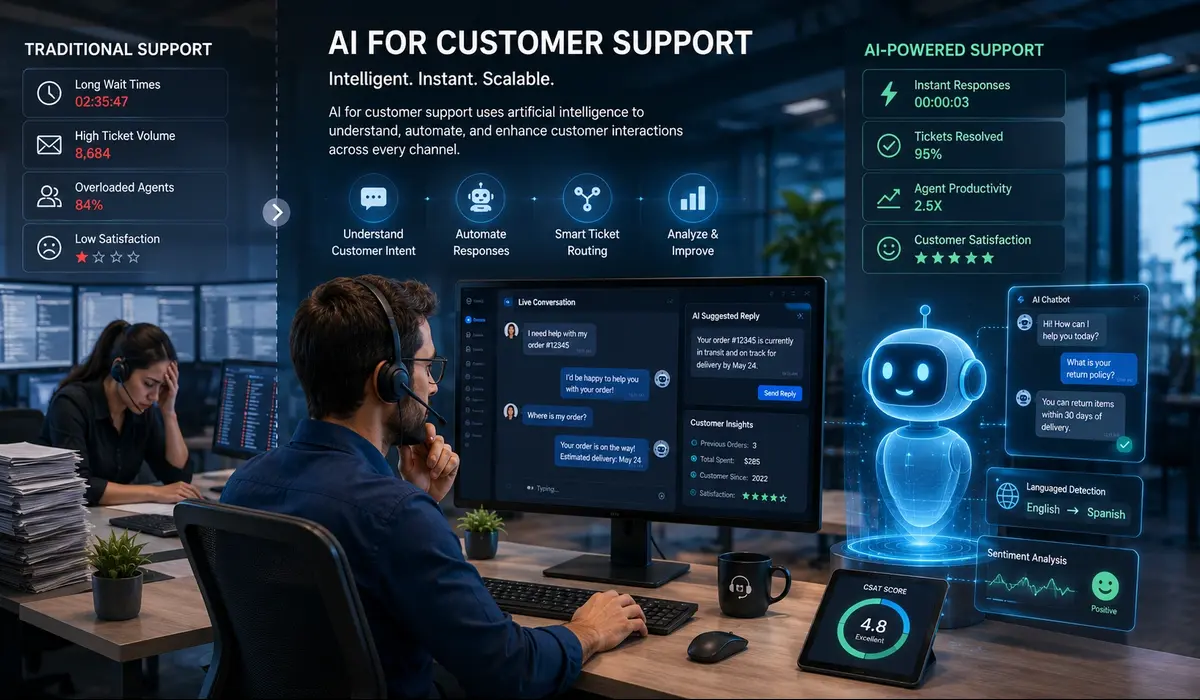
At its core, AI in customer support is about using artificial intelligence to handle, assist, or improve the way businesses respond to customers. That can mean a chatbot answering questions at midnight, a system that reads incoming tickets and decides who should handle them, or a tool that sits next to your agents and suggests what to say next.
It’s not one thing. It’s a collection of capabilities that, when put together, can quietly transform how a support team operates day to day.
Traditional Automation vs AI-Powered Support
There’s a version of “automation” that’s been around for decades, phone trees, canned response triggers, and rule-based bots that only work if you phrase something exactly right. Most people have experienced the frustration of that kind of system. You ask one thing slightly differently, and it completely falls apart.
Conversational AI support is a different animal. It understands what you’re trying to say, not just the specific words you used. It can handle follow-up questions, shift direction mid-conversation, and recognize when something is outside its ability to help. The old automation was a locked door with a specific key. Modern AI is more like a person who actually listens.
Why Businesses Are Investing in AI Customer Support
Three things are happening at once: support volumes are climbing, customer patience is shrinking, and hiring enough people to cover it all keeps getting more expensive.
AI doesn’t solve everything, but it handles the part of the workload that doesn’t need a human ,the repetitive, predictable, answerable stuff. That frees your actual team to focus on the harder conversations that genuinely need them.
Key Benefits of AI in Customer Support
Faster Response and Resolution Times
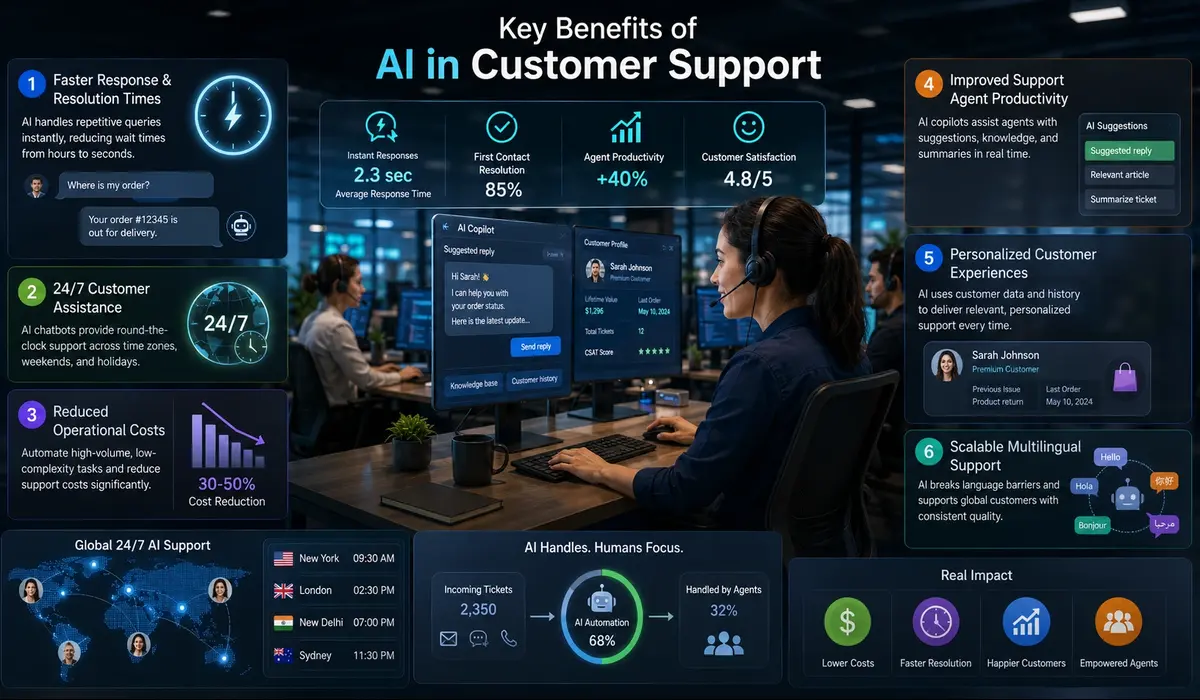
Nobody enjoys waiting two hours for a reply to a simple question. AI-powered support agents respond instantly, no queue, no delay. For the kinds of issues that come up constantly (order updates, password resets, policy questions), customers get answers the moment they ask.
24/7 Customer Assistance
Your team works a shift. Your customers don’t. An AI chatbot for customer support keeps things running after hours, through weekends, across time zones. A customer in Sydney asking a question at 11 PM their time doesn’t have to wait until your New York office opens.
Reduced Operational Costs
This is usually the first thing finance teams notice. When customer support automation handles the high-volume, low-complexity tickets, your team’s time goes further. You are not adding headcount every time you add customers. Businesses that have done this well report cost reductions of 30–50% in support operations, not from cutting staff, but from getting more out of the team they already have.
Improved Support Agent Productivity
AI copilots are one of the more underrated tools out there. They sit in the background while an agent is in a conversation, pulling up relevant articles, suggesting responses, and summarizing ticket history. The agent doesn’t have to dig through five tabs to find context, it’s already there. Less friction per ticket means agents close more of them, and they’re less burned out at the end of the day.
Personalized Customer Experiences
A customer who’s contacted you three times about the same product and just bought an upgrade shouldn’t have to re-explain their situation from scratch. Good AI customer experience pulls that history in automatically. The conversation picks up where it left off. That kind of continuity is what turns a support interaction into something that actually builds loyalty.
Scalable Multilingual Support
Expanding into new markets is hard enough without having to staff a separate support team for every language. Generative AI for customer service handles this without breaking a sweat ,one system, dozens of languages, consistent quality across all of them.
Top AI Tools for Customer Support in 2026
-
Zendesk AI
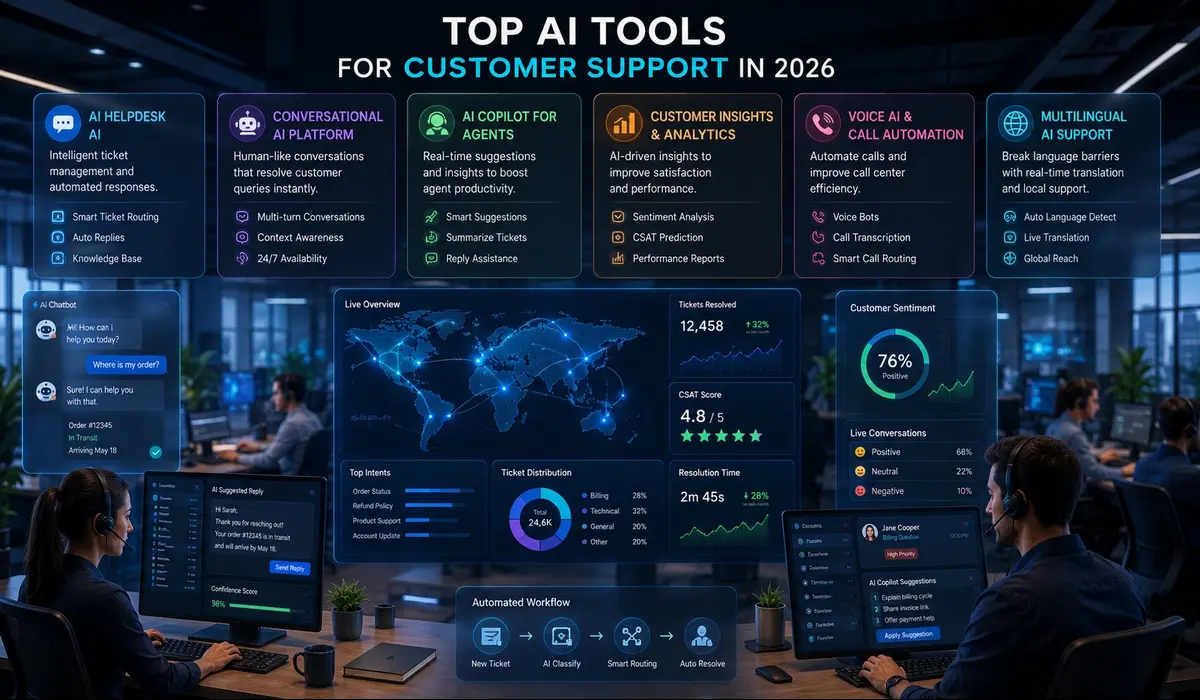
If you are already on Zendesk, their AI layer fits right in. It handles AI ticket routing, summarizes long threads, detects intent, and generates draft replies based on your knowledge base. Teams that have built their support operations around Zendesk will feel at home, the AI is trained on your own historical ticket data, so it gets more relevant over time.
-
Intercom
Intercom’s Fin is genuinely impressive for SaaS support. It reads your help documentation and answers questions in full sentences, not just links to articles. When it can’t handle something, it escalates cleanly. Multi-turn conversations ,where a customer asks a follow-up, then another ,don’t trip it up the way older bots do.
-
Freshworks
Freddy, Freshdesk’s AI assistant, is worth a look for mid-sized teams that want practical AI helpdesk tools without a six-month implementation. It covers the full AI support workflow: customer-facing answers, agent suggestions, and ticket management. The setup is straightforward enough that you’re not dependent on a consultant to get started.
-
Salesforce Service Cloud AI
Einstein is built for teams operating at scale. Case classification, intelligent routing, next-best-action recommendations for agents, it’s comprehensive. If your business already lives in Salesforce, this is a natural extension. For smaller operations, it’s probably more than you need.
-
HubSpot Service Hub
HubSpot’s edge is the CRM connection. Because your support, sales, and marketing data all live in the same place, the AI has a fuller picture of each customer. That translates into support interactions that feel less transactional. Good option for growing businesses that don’t want to stitch together separate tools.
-
Tidio
Tidio is the easiest one on this list to get running. Ecommerce businesses especially love it ,the Lyro AI handles a high percentage of repeat questions out of the box, setup takes hours rather than weeks, and the pricing makes sense for teams that aren’t at enterprise scale yet.
| Tool | Best For | Key Feature |
| Zendesk AI | Mid to large teams | Ticket routing + auto-responses |
| Intercom (Fin) | SaaS companies | Contextual multi-turn AI chat |
| Freshworks | SMBs | End-to-end Freddy AI assistant |
| Salesforce | Enterprise | Deep CRM + case intelligence |
| HubSpot | Growing businesses | CRM-connected personalization |
| Tidio | Ecommerce startups | Easy setup, affordable Lyro AI |
Where is AI Used in Customer Support
-
AI Chatbots for Instant Support
Most support teams field the same 20 or 30 questions every single day. Shipping times, return policies, how to reset a password, where to find an invoice. An AI chatbot for customer support handles all of that without involving a human. It’s not glamorous, but it’s where a huge chunk of ticket volume lives, and where AI pays for itself fastest.
-
Automated Ticket Routing and Prioritization
AI ticket routing reads every incoming request and figures out where it needs to go. Billing issue? Goes to billing. Technical bug? Goes to engineering. Customer who’s written in three times this week about the same problem? Gets flagged as high priority. The difference this makes to a support team’s daily sanity is hard to overstate.
-
AI-Powered Knowledge Base Assistance
One of the quieter wins. Instead of a customer having to search through your help center and hope they land on the right article, AI finds it for them mid-conversation ,or just uses it to write a direct answer. Your knowledge base stops being a library nobody navigates well and starts becoming something that actually helps people.
-
Sentiment Analysis and Escalation
This one matters more than people give it credit for. AI can tell the difference between a customer who’s mildly frustrated and one who’s about to churn. A message like “forget it, I’ll just cancel” shouldn’t be auto-replied to ,it should go straight to a senior agent. Sentiment analysis catches those signals and escalates before it’s too late.
-
Voice AI and Call Center Automation
Voice AI handles the front end of inbound calls ,verifying who the customer is, pulling up their account, answering common questions. If the issue needs a human, the call gets transferred with all the context already loaded. Customer service automation in call centers is trimming handle times in ways that used to require significant staffing changes.
-
Multilingual Customer Support
One AI system, automatic language detection, responses in whatever language the customer writes in. For businesses with global customers, this removes a real operational constraint without adding cost.
-
AI Copilots for Human Support Agents
Think of it as a very good research assistant that never gets tired. While the agent is in conversation, the AI is pulling up similar past tickets, suggesting responses, and flagging if something looks like it needs escalation. Agents work faster and make fewer mistakes. That combination shows up quickly in CSAT scores.
Also Read: Top 5 AI Agents That Cut Your Customer Support Efforts by Half
Real Examples of AI in Customer Service
Ecommerce Customer Support
“Where’s my order?” is probably the most common support ticket in ecommerce. AI handles it automatically by connecting to order tracking systems, the customer asks, the AI checks, the answer comes back in seconds. No human touched it. This alone deflects a massive percentage of tickets for most online retailers.
SaaS Customer Support
SaaS support tends to involve a mix of onboarding questions, feature confusion, and the occasional billing dispute. AI handles the first two categories well, it knows your product, it knows the docs, and it can walk someone through a feature without getting impatient. Billing and account access issues, where trust matters more, go to humans.
Banking and Financial Services
Banks are using conversational AI support for balance checks, transaction lookups, fraud alerts, and appointment scheduling. The AI handles identity verification upfront, so by the time a human picks up a sensitive case, they already know who they’re talking to. That saves time and reduces risk.
Healthcare Support Systems
Healthcare providers deal with a lot of appointment-related volume ,bookings, reschedules, insurance questions, prescription refill requests. AI handles the logistics while keeping the AI support workflow within compliance guardrails. Clinical questions still go to trained staff.
Telecom and Utility Providers
Outage days are brutal for telecom support teams. AI handles the volume of “is there an outage in my area?” tickets automatically, provides updates as they’re available, and reserves human agents for escalations and complex billing disputes.
How to Use AI in Customer Support Successfully

-
Identify Repetitive Customer Support Tasks
Before you look at a single tool, go back through your last three months of tickets. Tag the categories. You’ll almost certainly find that a handful of question types make up 40–60% of your total volume. Those are your starting points. Doing an AI opportunity audit for your product before committing to any platform helps you identify AI automation opportunities that will actually move the needle, rather than buying something impressive that solves the wrong problem.
-
Choose the Right AI Customer Support Tools
The tool that works for a 300-person enterprise support team is not the tool for a 10-person startup, and vice versa. Match your choice to your real situation: what platform are you already on, what’s your actual ticket volume, and what does your team actually have time to manage? A tool nobody uses because it’s too complicated isn’t saving anyone anything.
-
Train AI Using Existing Support Data
Your historical tickets are more valuable than most teams realize. They contain the actual language your customers use, the actual questions they ask, and the actual answers your team has given. Feed that into your AI system and it starts from a much better place than a generic out-of-the-box model.
-
Keep Humans in the Loop
The quickest way to damage customer trust is to build an AI system that customers feel trapped in. Always have a clear path to a human. Be upfront about when they’re talking to AI. And make sure your escalation logic is tested ,not just assumed to work.
-
Monitor Performance and Continuously Improve
AI is not a set-it-and-forget-it solution. Check it weekly, at least at first. Look at where it’s getting things wrong, what questions it’s punting on that it shouldn’t, and what answers are landing badly. Treat it like a new team member ,one that needs feedback and correction to get better.
Challenges and Limitations of AI in Customer Support
-
Lack of Human Empathy
There are conversations where what the customer actually needs is to feel heard. AI can produce empathetic-sounding text, but there’s a difference between language that resembles empathy and a real human response. For genuinely difficult situations, the lack of a real person on the other end shows ,and customers notice.
-
Hallucinations and Incorrect Responses
This is a real problem with generative AI for customer service and it deserves more attention than it usually gets. AI can generate confident, clearly-worded answers that are just wrong. If a customer gets told their return window is 45 days when it’s actually 14, you have a mess to clean up. Strong knowledge base management and regular auditing are non-negotiable.
-
Data Privacy and Compliance Risks
Customer conversations contain personal data. Depending on your industry and geography, that means GDPR, CCPA, HIPAA, and other regulations apply to how you store, process, and use that data. Not every AI vendor takes this as seriously as they should. Do your due diligence before handing over customer data to any tool.
-
Poor Training Data Quality
If your existing support tickets are inconsistent, full of outdated information, or just messy ,the AI trained on them will reflect that. Cleaning your data first feels like extra work. Skipping it and dealing with a poorly performing AI later is much more painful.
-
Over-Automation Hurting Customer Experience
There’s a version of this that goes badly: every response is AI-generated, escalation is buried or broken, and customers feel like they’re talking to a wall. When automation makes people feel less cared for, not more helped, you’ve gone too far. The tool is supposed to support the experience, not replace it entirely.
Best Practices for Implementing AI Customer Support
Start With a Single Support Workflow
Automate one thing first. The most common, most repetitive, least complicated ticket type your team handles. Prove it works, measure it, fix the rough edges. Then move to the next thing. Trying to automate the whole support operation in one go almost always ends in a messy rollback.
Use AI to Support Humans, Not Replace Them
The framing matters here. AI handles scale ,the volume of interactions no team could respond to fast enough alone. Humans handle judgment ,the conversations that require reading between the lines. The teams that get this balance right end up with both better metrics and happier agents.
Maintain a High-Quality Knowledge Base
Your AI will only be as reliable as the information it draws from. An outdated help article gives outdated answers. A missing article creates a gap the AI fills with a guess. Keeping your knowledge base accurate and current is the most important behind-the-scenes maintenance task in any AI support setup.
Regularly Review AI Responses
Pick a sample of AI-handled conversations every week and actually read them. Not just the flagged ones ,the ones that closed without a complaint too. Sometimes bad answers slip through without anyone raising a hand. Human review is how you catch that before it becomes a pattern.
Measure ROI and Customer Satisfaction
The two numbers that matter most: are costs going down, and are customers happy? Track ticket deflection rate, first contact resolution, average handle time, and CSAT ,and compare before and after. If the numbers aren’t moving in the right direction, that’s information you need to act on.
Conclusion
The businesses getting the most out of AI for customer support aren’t the ones who automated the most. They’re the ones who thought clearly about where AI actually helps, started with something specific, and kept humans involved where it counted.
The technology is genuinely capable now. The tools are mature, the use cases are proven, and the customers on the other end ,when it works well ,don’t mind at all. What they care about is getting good answers quickly. AI, done right, delivers exactly that.
Start with one workflow. Measure it honestly. Build from there.
FAQ
What is AI for customer support?
It’s the use of artificial intelligence ,chatbots, machine learning, natural language processing ,to help businesses handle customer interactions faster and at greater scale. It covers everything from answering FAQs automatically to helping human agents respond more effectively.
What are the best AI tools for customer support?
Zendesk AI, Intercom (Fin), Freshworks (Freddy), Salesforce Service Cloud, HubSpot Service Hub, and Tidio are among the strongest options in 2026. Which one fits depends on your team size, existing stack, and what specific problems you’re trying to solve.
How do businesses use AI in customer service?
Most commonly: chatbots for instant answers, AI ticket routing to send requests to the right team, agent copilots that suggest replies, sentiment analysis to flag frustrated customers, and voice AI for call centers. The specific mix depends on the business.
Can AI replace customer support agents?
For routine, high-volume, predictable queries, it can handle a lot. But for anything that involves nuance, emotion, or real judgment, humans are still essential. Most teams that do this well use AI to handle the load so their agents can focus on the conversations that actually need them.
Are there free AI tools for customer service?
Tidio and HubSpot both have free tiers. Most platforms offer free trials. They are limited compared to paid plans, but they’re a reasonable way to test before you commit to anything.
How do I start implementing AI in customer support?
Pull your last 90 days of tickets. Find the question types that keep repeating. Start there. Pick a tool that fits your existing setup, train it on your real support data, and check the results weekly for the first few months.
What industries benefit most from AI customer support?
Ecommerce, SaaS, banking, healthcare, and telecom consistently see the strongest results. They share two things: high ticket volumes and a significant portion of queries that are routine enough for AI to handle well.