Softude

The best AI helpdesk for IT can securely resolve your most common tickets within your existing systems. Teams using ServiceNow, Jira Service Management, or Freshservice should begin with built-in AI. Slack-focused teams should compare Console and Unthread. A custom agent is best for mixed technology environments or strict data requirements.
Key highlights
- Judge each AI helpdesk by which tickets it can close on its own, not by how well it chats.
- Start with the AI built into your ITSM before adding a separate tool.
- Most tools answer and route requests; few can safely change access or fix devices.
- Regulated teams should prioritize inference location, data redaction, agent identity, and audit logs.
- Measure ROI through time saved, costs avoided, and risk reduced, not deflection alone.
What is an AI helpdesk?

An AI helpdesk for IT is a service desk agent that answers employee questions and completes routine requests through your ITSM, identity, and chat tools.
The term covers three capabilities: a chatbot that answers from your documents, AI features that help human agents with ticket triage and replies, and an agent that takes action. If all your IT team needs answers on troubleshooting and common resolutions from your company’s knowledge base, then a knowledge base chatbot may be enough.
What is the best AI helpdesk for internal IT support?
The best AI helpdesk for internal IT support depends on your company size, existing IT infrastructure, and automation requirements. Freshservice is a strong choice for mid-sized IT teams, ServiceNow suits large enterprises with complex workflows, and Moveworks is a good fit for AI-powered employee self-service. If you need greater control over data, models, and custom integrations, consider building a custom AI helpdesk agent.
Which IT tickets can an AI helpdesk agent resolve without human approval?
An AI helpdesk can autonomously resolve routine IT tickets such as password resets, account unlocks, software access requests, VPN troubleshooting, and common email issues. However, it should close a ticket only when the solution is documented, the agent has permission to execute the required action through an API, and the action can be safely reversed if something goes wrong.
Tickets involving security risks, complex technical failures, or sensitive access changes should be escalated to IT staff.
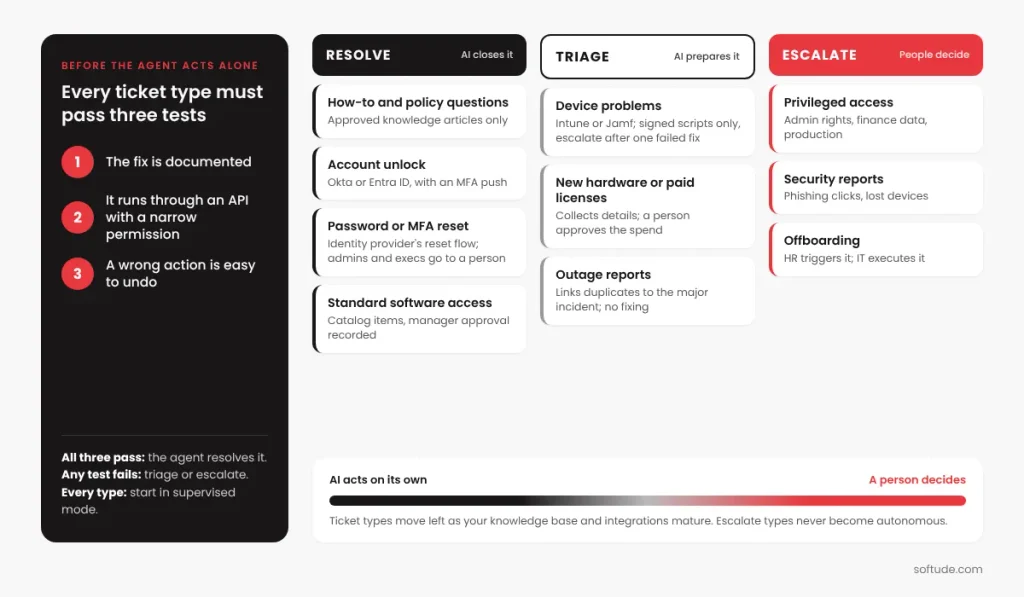
Outage reports require a different approach. The agent should identify duplicate reports and direct employees to the active incident, while the operations team remains responsible for resolving the outage with support from its AI agents for DevOps and incident response.
Does the AI helpdesk just answer, or can it actually fix things?

An AI helpdesk can do more than answer questions. Depending on its capabilities and integrations, it can assist human agents or execute approved actions such as granting software access, unlocking accounts, and running IT troubleshooting workflows. However, not every AI helpdesk supports autonomous execution.
AI helpdesk tools generally operate at three levels:
| Level | What it does | Examples |
| Answers | Responds using your knowledge base and internal documentation. | Jitbit drafts replies from knowledge articles; Unthread answers questions inside Slack threads. |
| Assists | Summarises tickets, routes requests, and drafts replies for human agents. | ServiceNow Now Assist summaries; Freddy AI Copilot in Freshservice; Jitbit summaries and triage. |
| Executes | Performs approved actions, such as granting access, unlocking accounts, and running automated fixes. | Console provisions access with approvals and scheduled removal; ServiceNow AI agents execute ServiceNow workflows; Rovo in Jira Service Management handles qualifying requests autonomously. |
The biggest difference is between assisting and executing. A tool that only drafts a response still leaves the technician responsible for making changes in systems such as Okta, Microsoft Entra ID, or Intune.
How to evaluate this capability: Ask every vendor to demonstrate a live execution in a test environment connected to your own IT stack. For example, ask the AI agent to add an employee to an approved software access group.
A demonstration using the vendor’s sample data won’t reveal whether the tool can handle your actual permissions, approval workflows, and execution failures.
Will an AI helpdesk agent work with your ITSM, identity, and chat tools?
An AI helpdesk agent should integrate with your existing ITSM platform, identity management systems, and employee communication tools to resolve requests without forcing employees or IT staff to switch between applications. For example, it should connect with ServiceNow or Jira Service Management for ticket management, Microsoft Entra ID or Okta for identity and access tasks, and Slack or Microsoft Teams for employee support.
However, having an integration does not automatically mean the AI can perform actions. Check whether the integration supports read-only access, ticket updates, or actual execution of approved IT tasks.
Should you use your ITSM’s built-in AI or build a custom AI service desk agent?
Start with your ITSM’s built-in AI when most tickets and knowledge live in one platform, and its prebuilt actions cover your top ticket types. Build a custom AI service desk agent when requests cross several systems, you run more than one ITSM, or data must stay in your environment.
A custom agent earns its cost when:
- Requests span HR, IT, and finance systems, or you run two ITSM platforms after a merger.
- You need approval rules the products can’t express, such as extra checks for executives or contractors.
- Data residency or industry rules require inference in your cloud or on your servers.
- You want to choose, test, and pin the model yourself.
Full control means you own testing, monitoring, and security. Our breakdown of no-code vs. custom AI agent development walks through that decision.
How secure is each AI helpdesk, and where does a custom agent fit?
An AI helpdesk must protect internal company data, respect existing access permissions, and restrict what it can change in connected systems. Most established AI helpdesk platforms offer security controls such as encryption, role-based access, audit logs, and enterprise compliance certifications. However, they differ in how they process customer data, choose AI models, manage agent permissions, and control automated actions.
Here’s where the major platforms differ:
| AI helpdesk | Security and governance strengths | Limitations to evaluate |
| ServiceNow | AI Control Tower governance, sensitive-data masking, and configurable guardrails. | Review model data-sharing defaults, regional processing, and which guardrails are enabled by default. |
| Moveworks | SOC 2 Type II, ISO 27001, and CSA STAR Level 2 certifications. States that customer data is not used to train global generative models. | Multi-tenant SaaS deployment. Evaluate data residency, tenant isolation, and the implications of its ServiceNow integration. |
| Jira Service Management with Rovo | SOC 2 and ISO 27001 certifications, permission-aware knowledge retrieval, and audit logs. | Limited choice of LLM providers. Check where third-party inference occurs and whether it meets your data residency requirements. |
| Freshservice (Freddy AI) | Role-based access, audit logs, and prompt-injection protection. | Review data-use and model-training policies, including available opt-out controls. |
| Microsoft Employee Self-Service agent | Microsoft 365 security controls, Microsoft Purview integration, and enterprise data protection. | Advanced governance capabilities may require higher-tier licenses. Connected systems can have different permission models. |
| Console | SOC 2 Type II and HIPAA-related controls, least-privilege actions, approval workflows, and SIEM-ready logs. | SaaS deployment and reliance on its policy engine for action approvals may limit control over certain workflows. |
| Unthread | SOC 2 Type II, HIPAA-related controls, audit logs, and bring-your-own-model options. | Security depends partly on your Slack environment. Evaluate support for identity, device management, and cross-system permissions. |
| Jitbit | On-premises deployment and support for self-hosted AI using your own model credentials. | Verify independent security attestations and whether agent identities, action-level permissions, and approval workflows meet your requirements. |
Note: These are platform-level capabilities and limitations to investigate, not a guarantee that every feature is included in every subscription or enabled by default. Verify current contractual terms, security documentation, and deployment configurations before selecting a platform.
When does a custom AI helpdesk agent make more sense?
A custom agent becomes worth considering when standard helpdesk platforms cannot meet your requirements for data control, model selection, system integration, or action-level permissions.
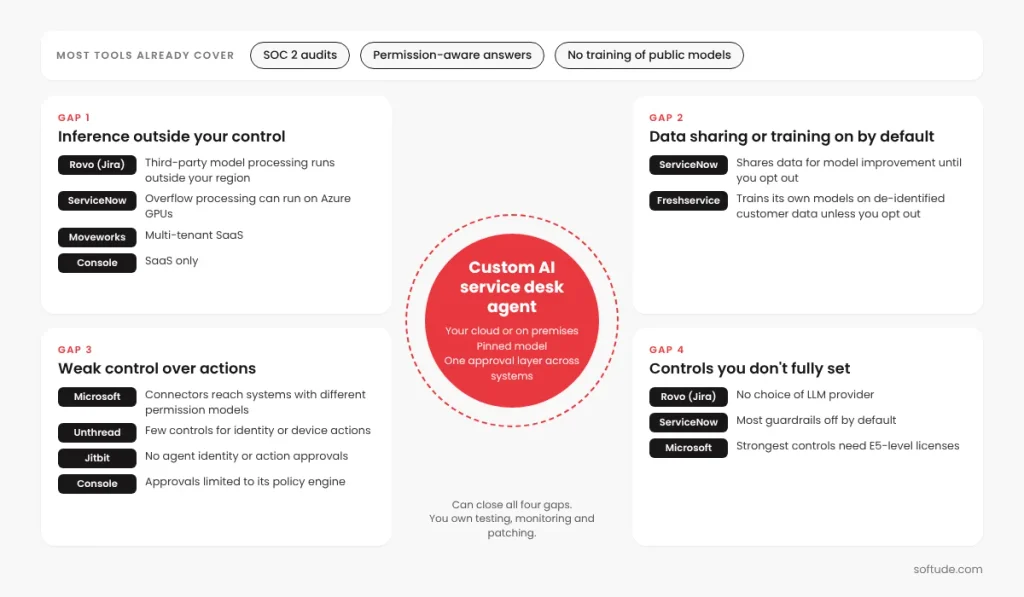
Consider building one when:
- You have strict data residency requirements: Internal tickets, employee records, and system logs must remain within a specific cloud environment or on-premises infrastructure.
- You need control over model selection: You want to use a specific LLM, self-host an open-weight model, or switch models without depending on a vendor’s roadmap.
- Your IT environment has complex integrations: The agent must work across legacy applications, identity providers, endpoint management tools, and internal APIs.
- You need consistent execution policies: You want a central approval and permission layer governing actions across multiple systems.
- You need custom workflows: Your incident management, access provisioning, and escalation processes don’t fit standard product workflows.
A custom agent also brings greater responsibility. Your team must implement identity management, least-privilege access, audit logging, prompt-injection protection, monitoring, and human approval for sensitive actions. Greater control does not automatically mean greater security.
Why does AI governance matter for internal IT support?
AI agents can do more than retrieve information. They can modify user accounts, change permissions, trigger workflows, and interact with production systems. A poorly governed agent can therefore turn a routine support request into an access-control issue or service disruption.
According to a Gartner survey of 298 infrastructure and operations leaders in the US and UK, conducted in June and July 2026, 70% believe their AI agents operate within safe boundaries. Gartner predicts that 40% of infrastructure and operations organizations scaling AI without strong governance will experience a business-critical service disruption by 2028.
For an internal AI helpdesk, governance should cover four things: what information the agent can access, which actions it can perform, when human approval is required, and how every action is recorded.
Our guide to guardrails for AI agents explains how to implement these controls.
How is AI helpdesk software priced?

AI helpdesk software is priced per support agent, per employee, by usage such as conversations or credits, or as part of a higher ITSM plan. The unit decides whether cost grows with your IT team, your headcount, or your ticket volume. Unthread prices per support agent; Microsoft’s agent runs on a Microsoft 365 Copilot license or Copilot Credits; Rovo comes with Jira Service Management Standard, Premium and Enterprise plans.
Usage-based pricing needs the closest watch. According to Gartner’s October 2026 forecast, through 2027, companies running IT operations AI agents on uncapped, token-based pricing will exceed their initial cost expectations by more than 50% compared with those on subscription pricing. A custom agent avoids license fees but adds build and upkeep costs.
How do you measure AI helpdesk ROI beyond resolution and deflection?
AI helpdesk ROI comes from employee time returned, technician time redeployed, and costs or risks avoided. Resolution and deflection rates show activity, not value. Convert each source into money, subtract the tool’s full cost, and compare against a baseline recorded before launch.
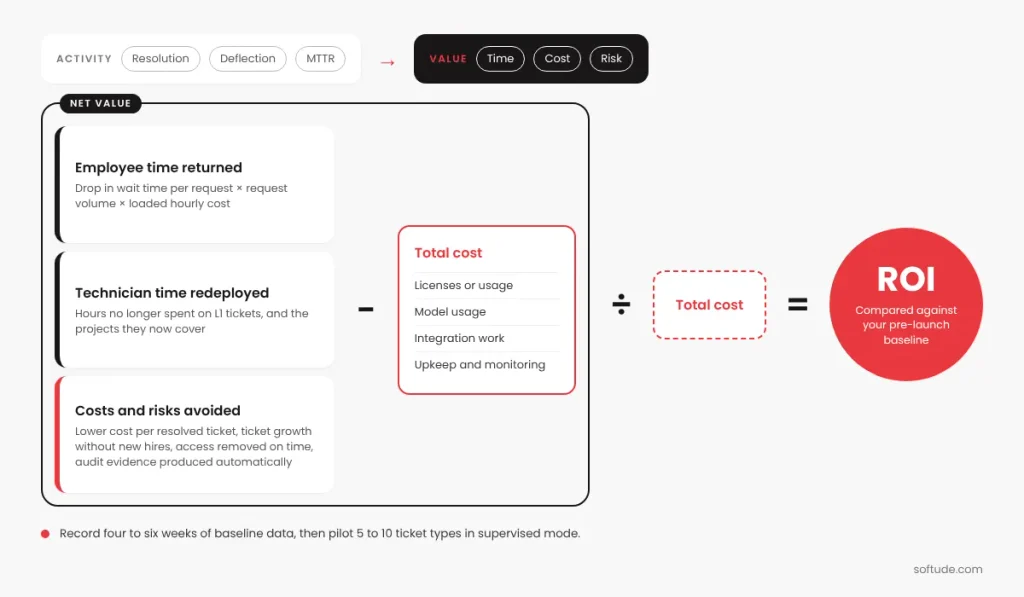
There is no honest single answer to how much an AI helpdesk can deflect: vendors define deflection differently, and an employee who gives up still counts as deflected. Use autonomous resolution (not reopened within seven days), reopen rate, escalation quality, and mean time to resolution (MTTR) as the base, then measure value:A simple formula keeps it honest: ROI = (value of time returned + time redeployed + costs avoided − total cost) ÷ total cost. Run it on a pilot of 5 to 10 ticket types that pass the three tests, in supervised mode, after four to six weeks of baseline data.
Final thoughts on choosing an AI helpdesk
The right AI helpdesk safely closes your most common tickets inside the systems you already run. Start from your ticket list, security rules, and ROI baseline, not a feature list.
If you want help mapping which of your IT tickets an agent could close, our team builds AI service desk agents and chatbots that connect to your existing ITSM and identity tools. Trust grows one ticket type at a time.
FAQs
Which AI helpdesk works best in Slack?
Console and Unthread are the strongest Slack-first options. Console focuses on IT access requests and also works in Teams, Google Chat, and email; Unthread turns Slack channels into a helpdesk for IT, HR, and finance. If your tickets live in Jira, its virtual service agent also works in Slack.
Which AI helpdesk works best in Microsoft Teams?
Microsoft’s Employee Self-Service agent is the natural fit for Teams-centered companies on Microsoft 365 Copilot, with connectors for ServiceNow, Workday and SAP SuccessFactors. Jira Service Management’s virtual service agent and Console also work in Teams, so match the choice to where your tickets are managed.
Is Moveworks still available without ServiceNow?
Yes. ServiceNow, which completed its acquisition of Moveworks in December 2025, confirmed in February 2026 that Moveworks continues as a standalone product. For Jira Service Management or Freshservice teams, the choice is a custom AI IT support agent vs. Moveworks under ServiceNow’s roadmap, so write integration commitments into any contract.
Can an AI helpdesk reset passwords safely?
Yes, if the agent hands the reset to your identity provider’s verification flow instead of trusting the chat. Help desks are a common target for impersonation, so require MFA and send admin and executive resets to a person.
How is an AI helpdesk different from a knowledge base chatbot?
A knowledge base chatbot answers questions from your documents. An AI helpdesk also handles ticket triage, approvals, and actions such as unlocking accounts. Many teams start with the chatbot and add actions once ITSM and identity connections are ready.