Softude

To run a private LLM, choose an open-weight model such as Gemma 4 or Muse Glimmer and size GPUs to its memory needs. Host it with an inference server like vLLM on cloud GPUs inside your own VPC, or on servers in your data center. Then connect your data and add access controls, encryption, and logging before launch.
Key highlights
- A private API endpoint keeps traffic off the public internet, but the provider still runs the model.
- Meta’s newest open weights now ship under the Muse name, not Llama.
- Check every model license; some Mistral models need a commercial license above $20 million monthly revenue.
- A 31B model can run on a single 80 GB H100; GPU memory, not parameter count, sets the hardware.
- Self-hosting agents only beats API pricing at high, steady token volumes.
What is a private LLM?
A private LLM is a language model deployed inside a boundary your organization defines, so your team decides where prompts are processed, where data is stored, and who can call the model. It doesn’t mean training a model from scratch. Most companies take an existing open-weight model and run it on approved infrastructure.
For example, a bank might deploy a model that answers questions from internal compliance documents, with the model and its document store running inside the bank’s own cloud account.
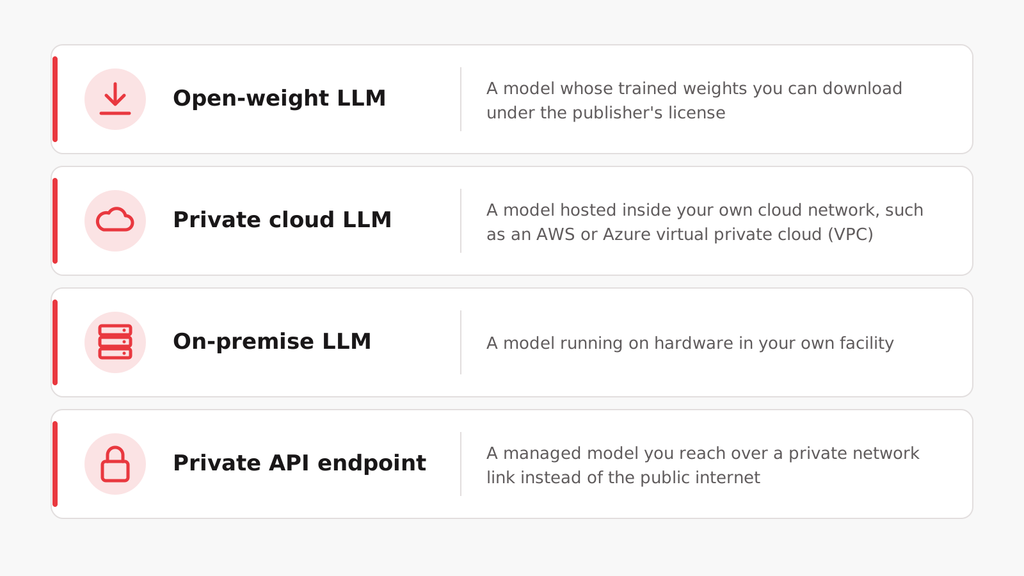
These are separate decisions. An open-weight model can run in a public cloud, and a proprietary model can be reached over a private link. For most buyers, an enterprise LLM setup combines a model choice, a hosting choice, and a network design.
How can you run an LLM privately without sending data to OpenAI’s public API?

You have three options. You can reach a managed model through a private endpoint, host an open-weight model in your own VPC, or run it on-premises. Only the last two keep inference on infrastructure you control. A private endpoint protects the network path, but the provider still processes the prompt.
| Factor | Private API endpoint | Private cloud | On-premise |
| Who runs inference | Provider | Your team | Your team |
| Model weights in your hands | No | Yes (open-weight) | Yes (open-weight) |
| Air-gapped possible | No | With careful design | Yes |
| Scaling | Provider-managed, within quotas | Add cloud GPUs | Limited by installed hardware |
| Upfront cost | Low | Moderate | High |
| Best for | Managed models with private networking | Control plus elastic capacity | Strict data and hardware ownership |
- Private API endpoint
Azure OpenAI and Amazon Bedrock both support private endpoints, so traffic from your virtual network reaches the model without crossing the public internet. OpenAI also offers Private Link for its own API.
- Private cloud (VPC)
You run an open-weight model on GPU virtual machines inside your own cloud account, typically with an inference server such as vLLM, a private application endpoint, a vector store for company documents, and your own identity and logging controls. You control the serving environment while the cloud provider owns the hardware.
- On-premise
You run the model on your own servers, which gives you full control over hardware, model files, and network, including an air-gapped setup with no outside connection.
How do you deploy an on-premises LLM?
To deploy an on-premises LLM, choose an open-weight model, size GPU servers for its memory needs, run it behind an inference server, and connect it to approved data sources through internal APIs. Then add identity, encryption, monitoring, and backups before any real user touches it.
A typical on-premises stack includes:
- GPU servers with enough memory for the model and its concurrent users.
- An inference engine such as vLLM, which serves models through an API and can split a large model across several GPUs.
- Internal APIs and the applications employees use.
- A document store or vector database for retrieval.
- Single sign-on, role-based access, encryption, and logging.
- Power, cooling, and spare hardware for failover.
Air-gapped deployments go one step further, with no direct link to outside networks. That raises the operational load: model updates, security patches, and software packages all have to move through a controlled offline process.
Which open-weight models fit private deployment?
The best fit depends on the task, available GPU memory, context length, and the license. Meta, Mistral, Qwen, and Google Gemma all publish models you can host, but their licenses differ more than their benchmarks do. Shortlist two or three and test them on your own data.
| Model family | What’s current (November 2026) | License to check |
| Meta | Muse Glimmer (30B, dense) and Muse Spark Open (816B total, 42B active). Llama 4 Scout and Maverick (April 2025) remain available | Glimmer is Apache 2.0. Spark Open uses the Muse Model License, which requires “Built with Muse Spark Open” attribution. Llama 4 uses the Llama Community License |
| Mistral | Apache 2.0 for most open models; Medium 3.5 and Devstral 2 use a modified MIT license | Modified MIT gives no rights to companies with more than $20 million in monthly revenue, according to Mistral’s Help Center licensing guidance, updated August 12, 2026 |
| Qwen | Frequent releases across language, coding, and multimodal models | Licenses vary by model; read the exact model card |
| Google Gemma 4 | E2B, E4B, 26B mixture-of-experts and 31B dense, released April 2026 | Apache 2.0, according to Google’s Gemma 4 announcement |
According to Hugging Face’s Muse Spark Open model card, Meta’s largest open model has a 1 million token context window. At 816B total parameters, it’s a cluster-scale deployment, so most private deployments will start with smaller models such as Gemma 4 31B or Muse Glimmer.
“Softude’s advice: Pick the smallest model that passes your own evaluation set. A bigger model you can’t afford to run at production volume is worse than a smaller one you can.”
What hardware do you need to host an LLM on-premises?
GPU memory decides the hardware. A model’s weights must fit in GPU memory, with room left for the KV cache that grows with context length and concurrent users. Start from the model’s size and precision, then test with real traffic. Many internal assistants never need a full H100 cluster.
For a dense model, weight memory is roughly the parameter count multiplied by bytes per parameter: about 2 bytes at FP16, 1 byte at 8-bit, and 0.5 bytes at 4-bit quantization.
| Model size | FP16 weights | 4-bit weights |
| 8B | ~16 GB | ~4 GB |
| 31B | ~62 GB | ~16 GB |
| 70B | ~140 GB | ~35 GB |
These are weight-only estimates. A 70B model at 4-bit may load on a 48 GB card and still struggle once 50 people use it at once, because the KV cache and batching need memory too.
Common data center options are the NVIDIA H100 (80 GB), H200 (141 GB), and L40S (48 GB). As a reference point, the unquantized Gemma 4 31B model fits on a single 80 GB H100. Quantization lowers memory needs, though it can reduce answer quality, so test it on your own tasks.
Ollama makes it easy to run models on a laptop or workstation for testing. For production, most teams move to vLLM or a similar server built for many concurrent requests.
How much does it cost to host your own LLM compared with a private API?

Self-hosting costs the same whether the GPUs are busy or idle, while API pricing scales with tokens. That makes a private API cheaper at low or uneven volumes and self-hosting competitive only at high, steady volumes, once you also count engineering and maintenance.
Cloud GPU prices give a quick baseline. According to Azure Retail Prices API data reported by Nodus on November 3, 2026, an eight-GPU ND H100 v5 instance costs $98.32 per hour on demand in East US, or $62.92 per hour with a one-year reservation. A single H100 NVL instance lists at $6.98 per hour, according to CloudRift’s October 2026 price comparison.
| Configuration | Hourly | Running 24/7 for a year |
| 8 x H100, on demand | $98.32 | $861,283 |
| 8 x H100, 1-year reserved | $62.92 | $551,179 |
| 1 x H100 NVL, on demand | $6.98 | $61,145 |
These figures cover compute only, not storage, networking, support, or staff.
How do you secure a private LLM for enterprise use?
To secure a private LLM, treat it like any other system that handles sensitive data. Control who can reach the model and its documents with SSO and role-based access, and encrypt data at rest and in transit. Log every request, and block prompt injection before production. Hosting the model privately doesn’t make it secure on its own.
| Area | What to verify before production |
| Identity | SSO, MFA and role-based access to the model, documents and admin tools |
| Network | Private endpoints, segmentation and firewall rules |
| Encryption | Model files, documents, logs and backups, at rest and in transit |
| Data residency | Where prompts, outputs, logs and backups are stored and processed |
| Application safety | Input checks, prompt-injection controls and human approval for sensitive actions |
| Monitoring | Access logs, unusual retrieval, latency and model version changes |
| Model governance | Model source, license and version control |
Retrieval needs the same permissions as the source systems. An HR user shouldn’t be able to pull finance records just because both teams share one assistant. Logs also need care, since stored prompts can become a new pile of sensitive data.
When is a private LLM overkill?
A private LLM is overkill when no policy requires inference on your own infrastructure, volumes are low or uneven, or no team can run GPU servers. In those cases, an enterprise AI subscription or a private API endpoint gives you most of the control with far less work.
| Your situation | Better starting point |
| Employees need help with research and writing | Enterprise AI subscription |
| Apps need a managed model over a private network | Private API endpoint |
| Documents must stay in your own cloud account | Private cloud LLM |
| Policy forbids any outside model processing | On-premise LLM |
| High, steady token volume | Evaluate self-hosting |
| No team to run model infrastructure | Managed API |
Private LLM vs ChatGPT Enterprise isn’t a question of which is safer. ChatGPT Enterprise gives you a managed workspace with enterprise controls. A private LLM gives you control over where inference happens, along with the responsibility for securing it. For chatbot projects specifically, we compare the trade-offs in OpenAI versus open-source LLMs for enterprise chatbots.
Choosing the right private LLM setup
The right setup starts with your data boundary, not with GPUs. Once you know whether prompts can leave your environment, the choice between a private endpoint, your own cloud, and your own servers becomes much simpler.
Softude can help you plan a private LLM deployment, from model evaluation and sizing to integration with your existing systems.
FAQs
Is a private LLM safer than ChatGPT Enterprise?
Not automatically. A private LLM gives you control over where inference runs, but you also own its security. ChatGPT Enterprise provides managed controls such as SSO and retention settings. A self-hosted model with weak access controls or careless logging can expose more data than a well-configured managed service.
Can a private LLM be HIPAA compliant?
Yes, if the full system meets HIPAA requirements. That includes access controls, audit logs, encryption, risk assessments, and business associate agreements with any cloud provider that handles protected health information. Hosting the model privately doesn’t satisfy those requirements on its own.
Is Ollama good enough for a production private LLM?
Ollama is great for testing models on a laptop or workstation. Production deployments usually need a server built for many simultaneous requests, such as vLLM, plus authentication, monitoring, and failover that a local setup doesn’t provide.
Do we need to fine-tune a private LLM?
Usually not at first. Most enterprise assistants get better results by retrieving answers from company documents at query time, which keeps answers current without retraining. Fine-tuning helps when you need a specific style, format, or narrow task that retrieval can’t fix.