Softude
So, you have decided to move to the cloud. Sounds great, right? But now comes the hard part: how do you actually make it happen without costly mistakes?
Maybe your on-prem systems are slowing you down. Maybe leadership wants faster innovation and better cost control. Whatever the reason, cloud migration is on your plate.
Now you face a big decision: Do you let your internal team handle the migration (DIY), or bring in experts for a managed migration?
Whatever you choose, it will affect your budget, timelines, and business continuity. To ease your burden, we have made a detailed comparison between managed cloud migration and DIY migration.
Why Cloud Migration Matters

Not all systems and apps can run on-premises because servers need constant maintenance, and they are a costly upgrade. Meanwhile, your competitors are moving faster because they’re already in the cloud, so it is obvious not to ignore cloud migration.
Another reason for this shift is these pain points:
- Scale when you need to: No more waiting weeks for new hardware.
- Pay for what you use: Stop spending on idle resources.
- Stay secure and compliant: Cloud providers invest heavily in security, so you don’t have to.
But a poorly planned migration can lead to downtime, data loss, and spiraling costs. That’s why choosing the right approach is so important.
What Are Managed Cloud Migration Services?
This is an end-to-end service where a certified external partner, a Managed Service Provider (MSP), or a cloud professional services team, takes ownership of the entire migration project.
What happens when you hand it over to the professionals:
- They start with a deep assessment of your current system, creating a custom roadmap using proven strategies (like the “6 Rs”).
- They use proprietary tools and automation to move applications and data with minimal disruption, set up your network, and run exhaustive testing.
- They don’t just move it; they tune it. They configure your cloud environment for security, compliance, and cost optimization from day one.
- They stabilize the new environment, train your internal team, and ensure a smooth handover.
This approach lets your internal team keep working on their existing priorities while experts execute the complex move.
What is DIY Cloud Migration?

This approach requires your in-house staff to leverage their existing infrastructure knowledge and rapidly acquire deep, specialized cloud skills. You maintain complete control over every architectural decision and every dollar spent.
What you need for migrating to the cloud on your own:
- Smart Tools: You must rely on native cloud tools (such as Azure Migrate and AWS DataSync) and Infrastructure as Code (IaC) tools (such as Terraform) to provision and manage your environment efficiently.
- Certified Team: You must have dedicated cloud architects and engineers who are certified and experienced with cloud networking, security, and the specific workloads you are moving.
- Time and Budget for Learning: You must accept that your team will face a learning curve, which means project timelines will likely be longer and require buffer time for troubleshooting.
So, Which is Better, Managed or DIY Cloud Migration
It depends on too many factors. Here’s a quick comparison of those factors:
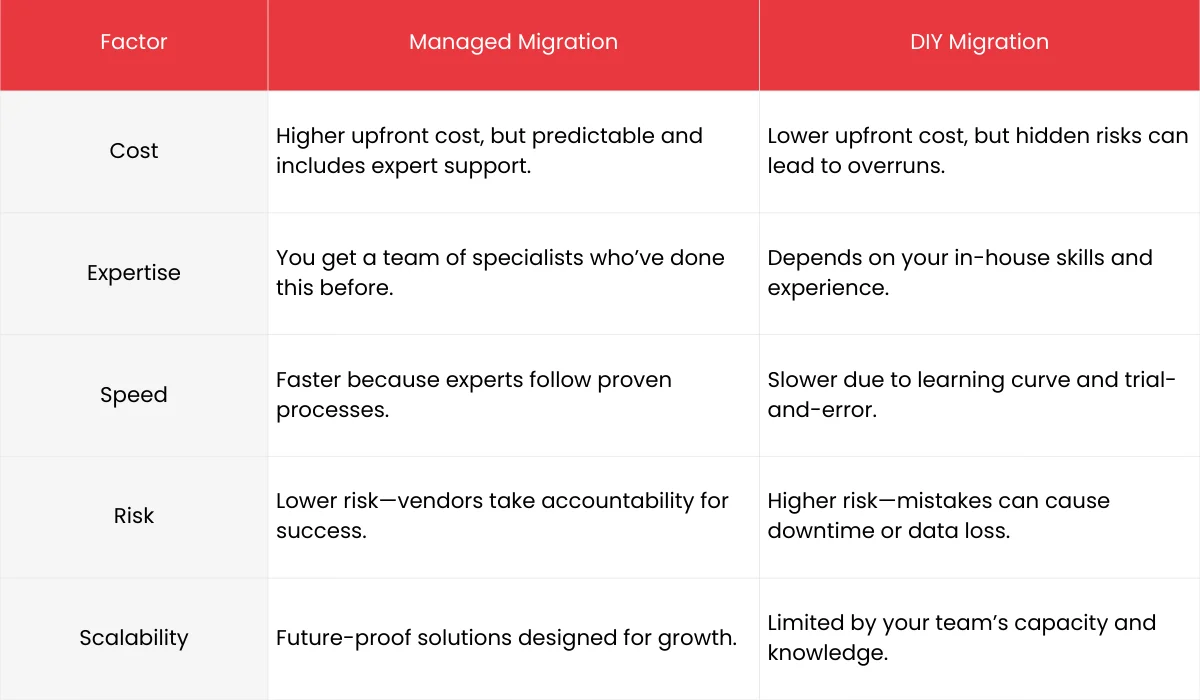
Managed cloud migration services buy you time and reduce the risk. You pay more upfront, but you get to the cloud faster and avoid costly, time-consuming mistakes.
On the other hand, DIY cloud migration buys you control and internal skill growth. You save money on service fees, but you risk delays, unexpected cost spikes, and high stress as your team learns on a mission-critical project.
Also Read: 10 Best Cloud Migration Strategies for Enterprises 2026
Important Questions to Ask Before Making a Decision
Looking at the comparison won’t help you reach a conclusion, but these questions can:
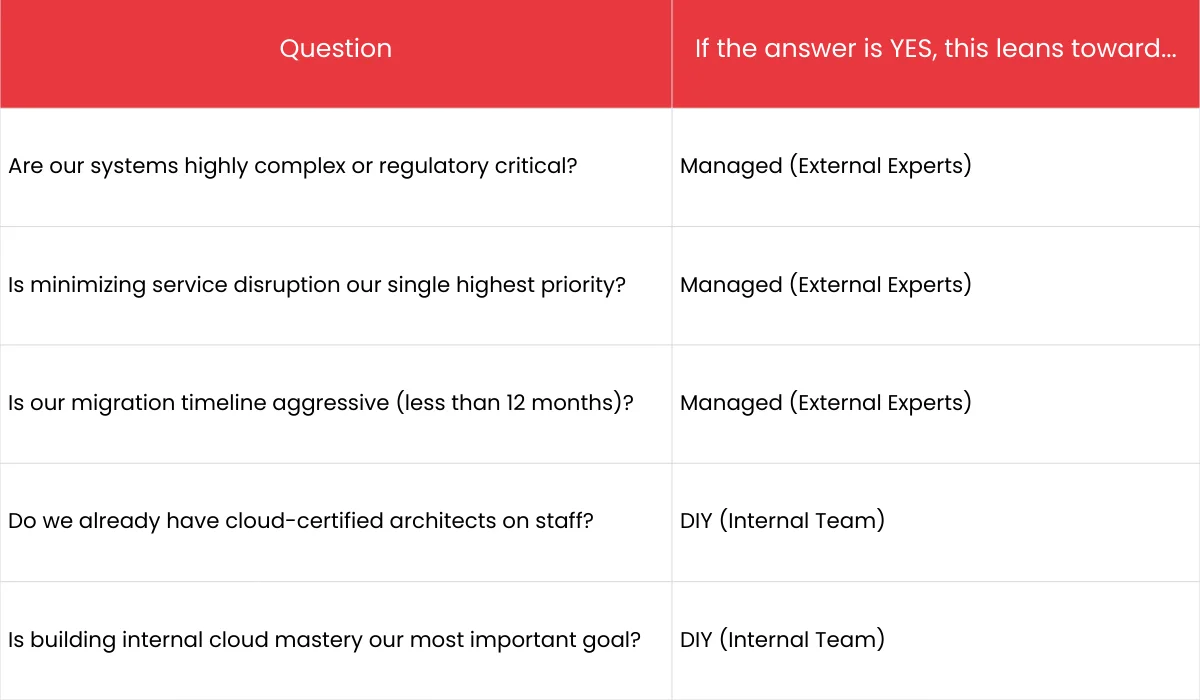
The Best Approach for Enterprises When Migrating to the Cloud
The good news is you don’t have to pick a single strategy. For many enterprises, the hybrid approach offers the best of both worlds.
The hybrid cloud migration strategy involves using external experts for the parts of the migration that carry the highest risk or require the most specialized skills, and using your internal team for the rest.
- Phase 1 (Managed): Hire a cloud migration service provider to handle the initial Discovery, create the overall Cloud migration strategy, and build the secure, optimized Landing Zone (the foundation of your cloud environment).
- Phase 2 (Co-Managed/DIY): Once the foundation is solid, your internal team takes over the bulk of the workload migration (the “lift and shift”) and future optimization.
This is often the most cost-effective and low-risk strategy, ensuring your foundational architecture is perfect while maximizing the internal knowledge gain.
Quick Tips for a Successful Migration (No Matter What You Choose)
These four steps are non-negotiable for success, regardless of your chosen path:
- Pre-migration Assessment (First Step): Use automated tools to discover everything about your current infrastructure, what depends on what, and your actual costs. Don’t rely on old spreadsheets.
- Security First: Implement a strong security framework from day one. Everything, including data in transit and at rest, must be encrypted.
- Focus on Optimization: Your enterprise cloud adoption isn’t done when the apps are running. Immediately set up FinOps (cloud financial management) tools to continuously monitor costs. If you aren’t optimizing, you’re wasting money.
- Automate Everything: Use Infrastructure as Code (IaC) tools to make your environment consistent and repeatable. Automation is your best defense against human error.
Conclusion
Cloud migration is a big move, and how you handle it can make or break the process. Managed migration gives you speed, expertise, and peace of mind, but at a higher upfront cost. DIY gives you control and can save money initially, but it comes with risks and a steep learning curve.
There’s no one-size-fits-all answer. The right choice depends on your workloads, team skills, timeline, and risk tolerance. If your migration is complex or business-critical, managed migration is usually worth the investment. If it’s small and your team is confident, DIY can work.
Next step: Consult our cloud experts to understand how the cloud migration happens.
FAQs
1. Why should my enterprise move to the cloud?
Cloud migration offers flexibility, scalability, and cost efficiency. It helps businesses reduce infrastructure costs, improve security, and innovate faster. Staying on-prem often means higher maintenance and slower growth.
2. What is the biggest risk in DIY cloud migration?
DIY migration puts all responsibility on your internal team. If they lack experience, you risk downtime, data loss, compliance issues, and unexpected costs. It’s not just about moving data—it’s about doing it securely and efficiently.
3. Is managed migration always better than DIY?
Not always. Managed migration is ideal for complex, large-scale projects or when downtime is unacceptable. DIY can work for smaller migrations if your team has strong cloud expertise and time to manage the process.
4. How long does cloud migration take?
It depends on the size and complexity of your workloads. A simple migration might take weeks, while a large enterprise migration can take months. Managed services usually complete faster because they follow proven processes.
5. What makes Softude a good choice for managed cloud migration?
Softude brings 15+ years of experience in digital transformation and cloud solutions. Our team handles everything, from planning and execution to optimization and support—so you can focus on running your business without worrying about migration risks.
6. Does Softude support hybrid or multi-cloud strategies?
Yes. We help enterprises design and implement hybrid and multi-cloud environments that fit their business needs, ensuring flexibility, security, and cost optimization.
7. How do I know if my business is ready for cloud migration?
Start with an assessment. Softude offers a cloud readiness evaluation to identify gaps, risks, and the best migration strategy for your enterprise.
8. What’s the cost difference between DIY and managed migration?
DIY looks cheaper upfront, but hidden costs like delays, errors, and downtime can add up. Managed migration has a higher initial cost but offers predictable pricing and fewer risks.