Softude
Your AI coding agent just completed a task on your legacy codebase. It produced 400 lines of clean, well-structured code. It passed the linter. It passed the existing test suite. Two weeks later, production breaks in a way nobody saw coming, and the root cause traces back to the agent’s changes.
This is not a rare edge case. It is happening to engineering teams using Cursor, Claude Code, GitHub Copilot, and every other major AI coding tool on the market. A CodeRabbit analysis of 470 open-source pull requests found that AI-authored code produces 1.7x more issues per PR than human-authored code on mature codebases. Logic errors are 75% more common. Security vulnerabilities appear at 2.74x the rate. I/O performance problems are 8x more frequent.
The problem is not the model. The problem is context.
What is context engineering?
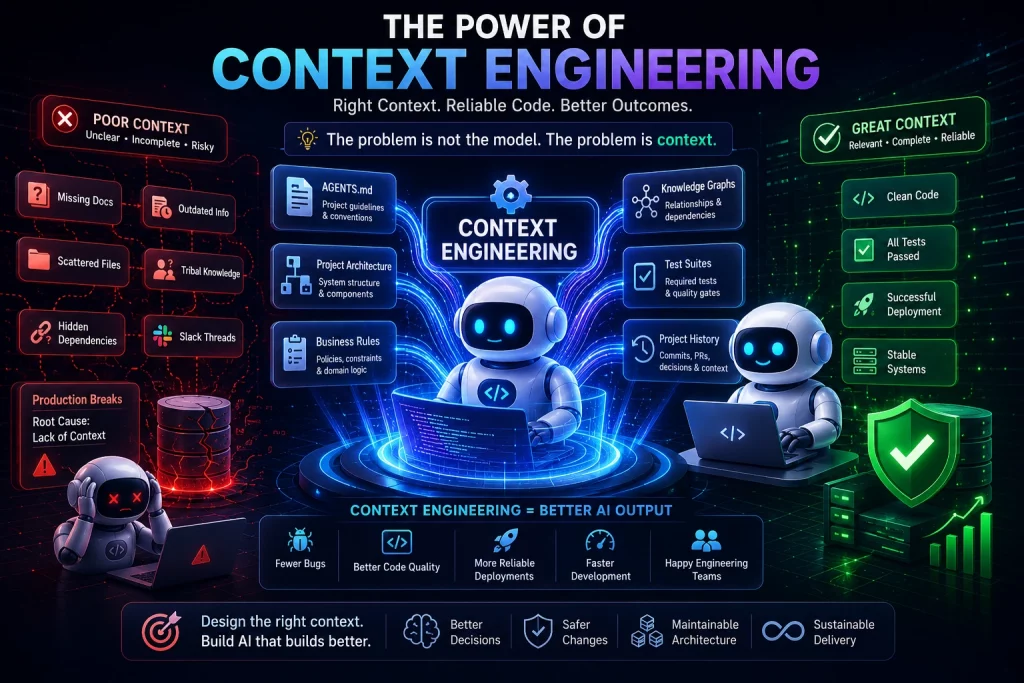
Context engineering is the practice of deliberately designing what an AI agent sees on every inference call, including system instructions, relevant files, project history, and business rules, so it produces reliable output rather than technically correct but architecturally wrong code. Anthropic formalized the term in September 2025 and it has since become the defining discipline for teams working with AI coding agents in production.
This article outlines 6 practical context engineering fixes that address why AI coding agents fail on legacy codebases. The framework was originally outlined by Softude’s Chief AI Officer in this post, and what follows expands on each fix with implementation detail for engineering teams.
Why Legacy Code Is a Completely Different Problem for AI Agents
AI coding agents perform impressively on greenfield projects. When there is no history, no hidden dependencies, and conventions are explicit, the agent has everything it needs within its context window. The entire project fits. The rules are visible. The output is usually solid.
Legacy code is the opposite of that.
Why Do AI Coding Tools Struggle With Legacy Codebases?
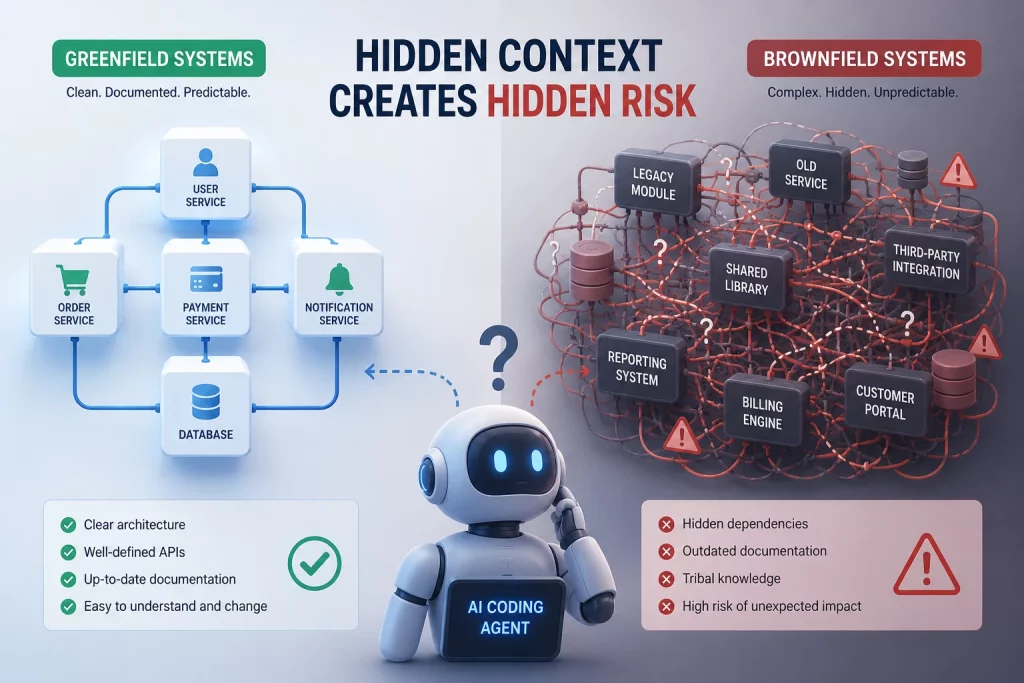
In a legacy system, the real constraints on what a function can safely do are scattered across incident postmortems from 2019, a Slack thread from 2021, deployment runbooks nobody updated, and the institutional memory of a developer who left the company three years ago. None of this exists in a file the agent can read. The context window cannot hold what was never written down.
This is what the industry calls the greenfield vs. brownfield gap. Greenfield code is self-documenting by default. Brownfield code stores its most important rules in people’s heads, not in the codebase.
There is also a technical dimension. When an agent tries to compensate by reading more files from a large codebase, its effective attention degrades. Research across 18 frontier models shows measurable accuracy drops as input length grows, a phenomenon called context rot. Loading a 300,000-line monorepo into the context window does not give the agent more useful information. It gives it noise that buries the signal.
The result is agents that produce code which is syntactically correct, passes the linter, satisfies surface-level tests, and breaks something nobody expected because the agent never had the context to know better. This is not a model capability gap. It is a context engineering gap. The rest of this article covers six ways to close it.
Fix 1: Give Your Agent a Project Briefing With AGENTS.md
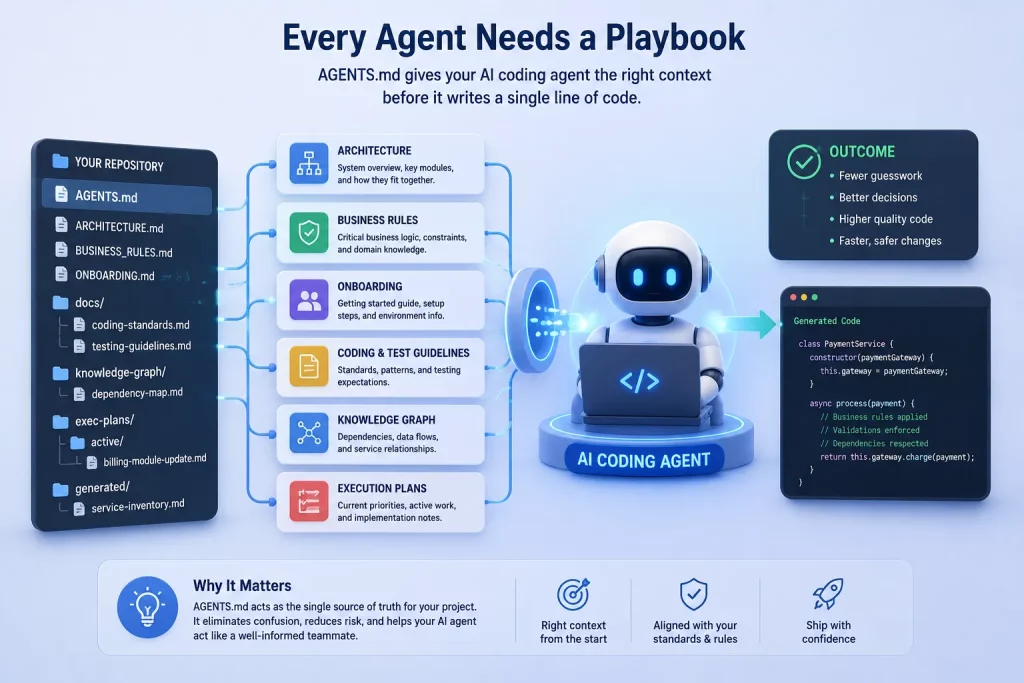
The single highest-leverage thing an engineering team can do for their AI coding agent is create a project-level context file. AGENTS.md (supported by Claude Code and Codex, and emerging as a cross-tool standard) is a version-controlled markdown file that tells the agent what it needs to know about your project before it writes a single line of code.
What Should an AGENTS.md File Include?
A well-structured repository gives AI agents access to architecture, business rules, testing requirements, and dependency information before they start making changes.
AGENTS.md
ARCHITECTURE.md
ONBOARDING.md
BUSINESS_RULES.md
docs/
  coding-standards.md
  testing-guidelines.md
knowledge-graph/
  dependency-map.md
exec-plans/
  active/
    billing-module-update.md
generated/
  service-inventory.md
A strong AGENTS.md covers five areas:
Project architecture overview. Is this a monolith, microservices, or something hybrid? What are the key modules and how do they relate? The agent needs a map before it starts navigating.
No-go zones. Payment modules, authentication flows, deprecated services that are still actively used in production. Identify the parts of the codebase where the agent should never make autonomous changes without human review.
Coding conventions and naming patterns. Your team’s patterns likely deviate from what the agent’s training data considers standard. If your codebase uses a specific naming convention, error handling pattern, or logging structure, document it here.
Known technical debt. Flag the areas where the agent should report problems rather than attempt to fix them. Legacy systems often have workarounds that look like bugs but are load-bearing. The agent does not know the difference unless you tell it.
Required test suites. Which tests must pass before any commit? Specifying this in AGENTS.md prevents the agent from submitting changes that pass only a subset of your testing requirements.
Without this file, the agent treats every file in the codebase equally and makes architectural decisions based on the nearest file rather than your team’s actual standards. This is the root cause of most “technically correct but systemically wrong” outputs.
One important note: treat AGENTS.md like production code. Version-control it. Update it when architecture changes. If it drifts from reality, the agent follows the old reality and the context rot compounds.
Fix 2: Onboard Your AI Agent Like a New Team Member
If AGENTS.md is the technical briefing, the onboarding document (referred to as the HELLO document in some workflows) is the business and organizational context. Think of it as what you would hand a senior contractor on their first day who has strong technical skills but has never heard of your company or your customers.
A useful onboarding document covers:
What this codebase solves and who depends on it. The agent needs to know it is working on a billing system that processes $2M in transactions daily, not just “a Node.js service.”
Recent major refactors or migrations. If the payment module was rewritten six months ago and the old pattern is deprecated but still present because two downstream services have not been updated, the agent needs to know this. Without the onboarding document, it will see both patterns, pick the one that appears more frequently in the codebase, and use the deprecated one.
Why unusual architectural decisions exist. Not just what the code does, but why it was built this way. Legacy systems are full of decisions that look wrong until you understand the constraint that forced them.
What broke recently. Document the last two or three significant incidents and what caused them. This prevents the agent from repeating a failure pattern your team already paid to learn about.
What “done” means. Your team’s definition of quality, whether that includes specific code review steps, documentation requirements, or performance benchmarks.
AI agents make logic errors on legacy code not because they lack coding ability. They lack organizational memory. The onboarding document gives them that memory.
Fix 3: Show the Agent What Good Looks Like Before You Ask It to Build
Before assigning a task on legacy code, show the agent a recently completed pull request that exemplifies your team’s standards. Walk it through what choices were made and why, especially the non-obvious ones.
This approach works because LLMs are in-context learners. A single well-chosen example from your actual codebase is worth more than 500 words of abstract instruction. This is especially true in legacy systems where your conventions may deviate significantly from modern defaults. The agent’s training data will pull it toward modern patterns if you do not explicitly anchor it to yours.
Here is how to apply this in practice. Select the most recent PR that reflects your quality bar. Ask the agent to read the diff and summarize what patterns it noticed. Verify its understanding, then assign the new task. The agent now has a concrete reference point rather than a set of abstract rules.
There is a cost: this uses tokens. For small, well-scoped tasks on code you have already briefed the agent on, skip it. Reserve this technique for multi-file changes, refactors, or anything that touches core business logic where the cost of getting it wrong exceeds the cost of a longer session.
Fix 4: Use Test-Driven Development as a Guardrail, Not an Afterthought
TDD is the most reliable structural constraint available for keeping an AI coding agent from silently breaking legacy systems. The workflow is straightforward: write the failing test first, describing the exact expected behavior, then ask the agent to write code that passes it.
How Do You Use TDD With an AI Coding Agent?
// Step 1: Write the failing test

describe("calculateTax()", () => {
  it("should apply 10% tax to USD transactions", () => {
    expect(calculateTax(100, "USD")).toBe(110);
  });
});

// Step 2: AI agent generates implementation

function calculateTax(amount, currency) {
  if (currency === "USD") {
    return amount * 1.10;
  }
  return amount;
}
In this workflow, the test defines the expected behavior before any production code is written. The AI agent’s job is not to guess what “correct” means but to generate code that satisfies the predefined requirements.
The key insight is that TDD constrains the agent to your intent rather than its interpretation. Without a test that defines “correct,” the agent is free to produce code that is plausible but wrong for your specific system.
This matters even more in legacy codebases because existing test coverage is often misleading. Many legacy systems show 60-80% line coverage that means almost nothing, because the tests were written to cover lines rather than behavior. An agent that passes those tests has validated very little about whether it preserved the system’s actual behavior.
Two techniques work especially well:
Characterization tests first. Before making any change to legacy code, instruct the agent to write characterization tests. These are tests that document what the existing code actually does, regardless of whether that is what it should do. This creates a behavioral baseline. Any change that breaks a characterization test is a breaking change, visible immediately rather than two weeks later in production.
Red-green-refactor with the agent. Write the failing test yourself. Hand it to the agent. Ask it to make it green. Review the diff. This keeps you in control of what “correct” means while the agent handles implementation speed.
Even teams not practicing full TDD should require one thing from the agent before it writes any production code: a failing test that captures the expected output. This single habit catches a significant proportion of silent failures that would otherwise only surface in production.
Fix 5: Map Your Codebase With a Knowledge Graph
A knowledge graph of your codebase is a structured map of how modules, functions, services, and data flows connect. It gives the AI agent a navigational structure instead of letting it explore blindly through file reads.
Legacy systems need this more than greenfield projects for a specific reason. In a new project, the dependency graph fits in a context window. In a 200,000-line legacy system, hidden dependencies only surface when something fails.
Consider the classic failure mode: a developer changes a currency conversion utility that is visibly used in price display. What is less obvious is that the same utility is also called within the checkout flow to normalize amounts before tax calculations. The change produces incorrect order totals, and there is no clear link to the modification. An AI agent makes the same mistake, faster and at greater scale, because it cannot see the hidden dependency.
In practice, teams can approach this at different levels of investment:
Full implementation. Tools like Sourcegraph, CodeScene, or custom-built call graph exports generate a dependency map that the agent can query on demand through RAG or MCP connections. This is the gold standard but requires meaningful setup.
Practical minimum. Add a “danger zones” section to your AGENTS.md that lists the most consequential hidden dependencies in plain language. Example: “The currency utility in /utils/currency.js is used by both the display layer and the checkout flow. Any change to this file must be tested against both paths.” This gives 80% of the benefit at 10% of the effort.
Architectural summaries. Store concise markdown files for each major module describing what it does, what depends on it, and what it depends on. The agent retrieves these on demand rather than having to parse the actual code to understand relationships.
The goal is not to build a perfect graph. The goal is to make the agent’s decisions about hidden dependencies deliberate rather than accidental.
Fix 6: Give the Agent Business Context, Not Just Technical Context
The most overlooked failure mode in AI-assisted legacy development is agents that are technically correct but business-wrong. They follow the coding convention. They pass the tests. They produce clean diffs. And the code breaks after the next requirement change because the agent had no idea why the original design existed.
Technical context tells the agent what the code does. Business context tells it why the code exists. Agents operating on technical context alone produce code that is architecturally plausible and strategically wrong. This is the hardest category of failure to catch in code review because everything looks fine on the surface.
Three practical ways to give the agent business context:
Add a “business logic layer” section to your AGENTS.md. Explain key domain concepts in plain language, not code. “This service handles invoice generation for enterprise clients who have 60-day payment terms. The 60-day window is contractual, not a default, and cannot be changed programmatically.”
Include the “why” behind unusual patterns. Example phrasing in AGENTS.md: “We use this deprecated pattern in the billing module because we have a contractual data format obligation with Client X that cannot change until Q4 2027. Do not refactor this.” Without this, the agent sees a deprecated pattern and helpfully modernizes it, breaking the contract.
Connect agent sessions to tickets or specs. When assigning a task, paste the relevant ticket description or user story that describes the user-facing intent. This bridges the gap between “fix this function” and “fix this function because users are seeing incorrect tax calculations when their account currency differs from the transaction currency.”
This distinction between common AI agent development mistakes and genuine model limitations is critical. Most failures on legacy code trace back to missing business context, not missing capability.
The Simplest Way to Think About All of This
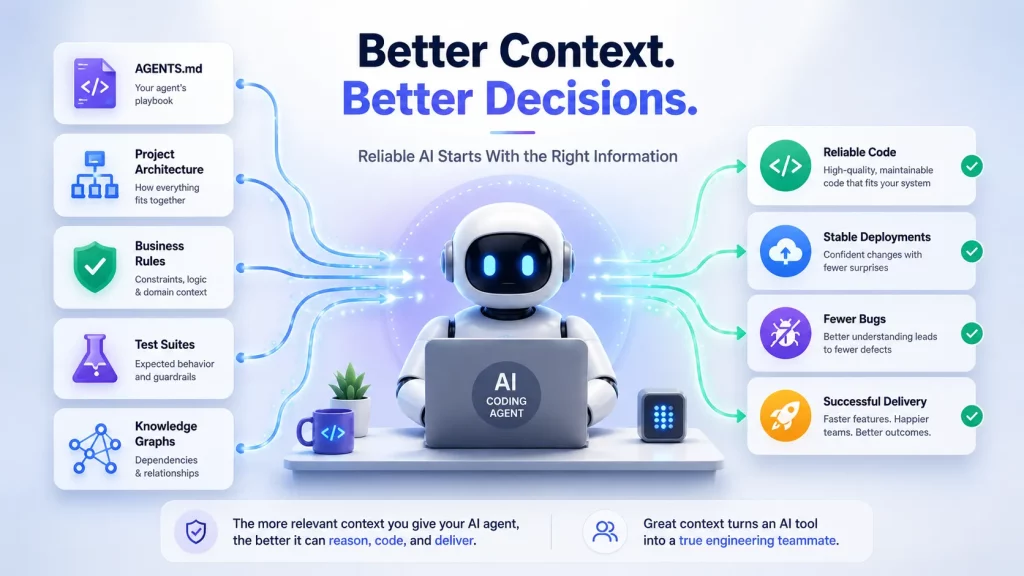
Your AI coding agent is a brilliant new developer who knows every programming language, has read every Stack Overflow thread, and has never heard of your company, your customers, your last outage, or the business reason your billing module works the way it does.
Giving it context is not optional preparation work. It is the actual job.
The six fixes in this article are six ways to transfer institutional knowledge, the kind that lives in people’s heads rather than in documentation, into your agent’s working memory before each session. AGENTS.md gives it the technical map. The onboarding document gives it the organizational memory. Before-demonstration anchors it to your standards. TDD constrains it to your intent. Knowledge graphs reveal hidden dependencies. Business context explains why the code exists.
Without these, you are not getting AI-accelerated development. You are getting fast-moving guesswork on a system that can break silently and at scale.
The good news is that none of these fixes require a new tool purchase. They require a new habit.
Start With One Fix Before Your Next Sprint
The teams currently winning with AI agent development are not the ones with the biggest model or the most expensive tool. They are the ones who invested time in what the agent sees before it writes a single line.
Pick the fix that addresses your team’s most recent AI-generated failure. If the agent produced code that was technically correct but wrong for your system, start with AGENTS.md. If it repeated a pattern that was deprecated six months ago, start with the onboarding document. If it passed all tests but broke production behavior, start with characterization tests.
Context engineering is not complex. It starts with a single file and a commitment to treating your agent like a team member who needs onboarding rather than a tool that needs prompts.
This framework was originally outlined in a post by Softude’s Chief AI Officer. Read the original: Why Your AI Coding Agent Fails on Legacy Code.
Building AI Agents That Work on Real Codebases? Softude Can Help.
At Softude, we build custom AI agents that are designed for the complexity of real enterprise environments, not just demos on clean codebases. Our AI agent development team works with engineering organizations to design agents that understand your architecture, respect your business logic, and integrate with your existing workflows.
Whether you are building AI-assisted development pipelines, deploying autonomous agents for workflow automation, or modernizing legacy systems with AI, Softude’s context-aware approach ensures your agents produce reliable output from day one.
Talk to our AI agent development team to discuss how context engineering can transform your development velocity without sacrificing quality.
Frequently Asked Questions
Context engineering is the practice of deliberately designing what an AI agent sees on every inference call. Unlike prompt engineering, which controls the wording of a single request, context engineering manages the entire information environment across a multi-step session. This includes system instructions, retrieved files, project history, business rules, and conversation state. The goal is to give the agent the right information at the right time rather than flooding it with everything and hoping it finds what matters.
Legacy systems store their most critical constraints in tribal knowledge, not in files. Business rules, hidden dependencies, deprecated-but-still-active patterns, and the reasons behind unusual architectural decisions typically exist only in people’s heads, old Slack threads, or incident postmortems. Since the agent’s context window cannot hold what was never written down, it fills the gaps with assumptions from its training data. Those assumptions work on greenfield code and fail systematically on mature codebases.
A strong AGENTS.md includes a project architecture overview, explicit no-go zones the agent should never modify autonomously, coding conventions specific to your team, known technical debt to flag rather than fix, and which test suites must pass before any commit.
Write the failing test first defining expected behavior, then ask the agent to write code that passes it. For legacy code, start with characterization tests that document existing behavior before making changes. This creates a baseline so breaking changes surface immediately.