Softude
AI engineers often ask this question: “What stack should I use to build an AI agent?” and many experts suggest either “just use LangChain” or a 5000-word post about 12 different frameworks that somehow don’t answer the question.
Before you get the answer, get one thing straight: an AI agent is not just an LLM with a prompt. Many AI engineers make the same mistake. They use the GPT-4 model, write a clever system prompt, and then wonder why the agent fails in real production.
In reality, an agent has five things:
- Model: the reasoning engine that makes the decision
- Orchestration: the logic that controls how the agent behaves step by step
- Memory: what the agent knows about past context
- Tools: external systems the agent can call and act on
- Runtime: where and how the agent executes
If any one of these layers is missing or poorly designed, your agent will fail in production. Not sometimes. Consistently.
Why Choosing an AI Agent Development Stack is Overwhelming

Honestly? Because the AI agent ecosystem is a mess right now.
LangChain, LlamaIndex, AutoGen, CrewAI, Haystack, DSPy, and a new framework that drops every few months each claim to solve everything. Then you go look at tutorials, and they’re all “let’s build an agent that summarises a PDF!” which is cool, but that’s not remotely close to what production looks like.
Three questions developers get stuck on:
- Do I actually need a vector database, or is that just what everyone says to add?
- Where exactly does tool calling happen, in the model or in my code?
- Should I pick a framework or just call the API directly?
To answer these questions, you must first understand the actual architecture of an AI agent.
The 5 Layers of AI Agent Architecture
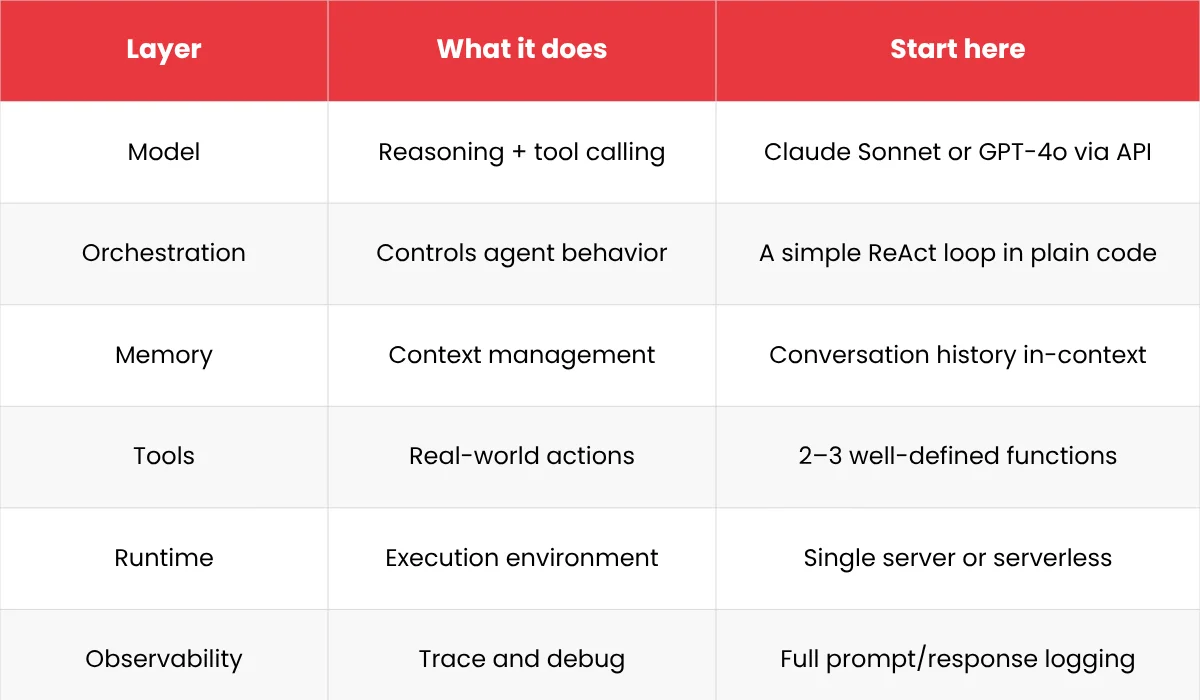
Layer 1: The Model
The model reads everything you give it from the system prompt, conversation history, and tool results and decides what to do next. Call a tool, respond to the user, ask a clarifying question, and give up. That’s it. That’s its job.
API vs. open source: For most developers starting out, just use an API model. GPT-4o, Claude Sonnet, and Gemini all work best. Self-hosting is a real option, but it’s also a real infrastructure project. Don’t do it until cost or compliance forces your hand.
Tool calling reliability: Here’s the thing nobody tells you upfront: not every model handles tool calling reliably. Some models return malformed JSON 5% of the time. Some lose track of what tools they’ve already called. Test your specific model against your specific tool schemas before you commit.
Latency vs cost: Bigger models reason better. They also cost more and respond more slowly. For simple, predictable tasks, a smaller model is usually fine. For anything that needs multi-step reasoning on ambiguous inputs, don’t try to save money here. A wrong tool call costs you more than a few extra cents on a smarter model.
For production-grade APIs
- OpenAI (GPT-4/5 series)
- Anthropic (Claude models)
For open-source / self-hosted
- Meta (LLaMA models)
- Mistral AI
Layer 2: Orchestration
People underestimate this layer. The model is the intelligence, sure, but orchestration is the behavior. It determines:
- What goes into the prompt
- Which tools are available
- What happens after a tool call returns
- When to loop back to the model vs when to stop
- What to do when something breaks
The basic pattern most agents use is called a ReAct loop. Model reasons → calls a tool → sees the result → reasons again → calls another tool or responds. Repeat until done. Sounds simple.
Framework vs. custom:
AI agent orchestration frameworks like LangChain give you prebuilt abstractions. You can have something running in an hour. The trade-off is that when something breaks, you’re now debugging their abstractions instead of your code. Developers spend two days debugging a LangChain chain that would have taken two hours in plain Python.
Custom orchestration means you write the loop yourself. More code up front, full control, way easier to debug.
If your agent follows a simple pattern: write it yourself. If you need prebuilt connectors to 15 different tools and data sources, a framework probably saves you real time.
Best frameworks
- LangChain
- LangGraph
- AutoGen
- CrewAI
Also Read: LangChain vs LlamaIndex: Best AI Framework for LLM Apps
Layer 3: Memory

There are two types of memory:
Short-term (in-context): The conversation history you pass to the model on every call. The model can only see what’s in this window. It’s simple, it’s fast, it works. The catch is that context windows have limits, and once you hit them, you have to decide what to drop or summarize.
Long-term (external storage): Redis, PostgreSQL, vector databases- anything that persists beyond a single conversation or a single context window.
You need a vector database when:
- You have a large corpus of unstructured text (docs, emails, knowledge base) that the agent needs to search.
- The search needs to be semantic, i.e., meaning-based, not keyword-based.
- It’s too big to just stuff into context.
You do NOT need one when:
- Your knowledge base is small (just put it in context)
- Your data is structured (use a real database with real queries)
- You’re still figuring out if the agent is even worth building
Add the vector database when retrieval quality becomes a measurable problem, not before. It adds real infrastructure complexity, and if you don’t need it yet, you’re just making your life harder.
Best tools
- Vector databases: Pinecone, Weaviate, Chroma
- Hybrid / SQL + vector: PostgreSQL
Layer 4: Tools
Tools actually make an agent useful, rather than just impressive in a demo. They let the agent take real actions: query a database, call an API, run code, send a message, read a file. The model decides to call a tool. Your code executes it. This distinction matters because the model isn’t running anything; it’s just telling your orchestration layer what to run.
Tool design is more important than people think.
Avoid making these common mistakes when designing tools:
- Tools with overlapping purposes (the model doesn’t know which one to pick, so it guesses)
- Too many optional parameters (the model starts hallucinating values for them)
- Tools that return giant unstructured blobs (eat your context window, confuse the model)
- Zero error handling (one API timeout crashes the whole thing)
Treat tool design like API design for a colleague who has to use it without asking you questions. Clear name, clear description, narrow scope, predictable output. That’s it.
Best options
Tool integration frameworks: OpenAI function calling, LangChain alternative tools
API orchestration: FastAPI, Node.js
Layer 5: Runtime

Where does your agent actually run? This affects reliability, cost, and how you handle failures.
Stateless vs stateful:
- Stateless: one request in, one response out, no memory between calls. You pass all the context with every request. Simple to deploy, easy to scale.
- Stateful: maintains context between calls, usually in a database. Needed for long-running tasks, background jobs, anything with real continuity.
Sync vs async:
- Sync makes sense when a user is waiting for a response
- Async makes sense when the task takes minutes, or when it’s a background job
Deployment: serverless functions work fine for stateless agents, containers for anything stateful or complex, and managed platforms if you want to avoid ops entirely.
Best options
- Docker
- Kubernetes
- Vercel
- AWS Lambda
Layer 6: Observability

Observability is the last in AI agent architecture, but honestly, it should be the first thing you set up.
Log:
- Every prompt you send (the full thing, not a summary)
- Every model response
- Every tool call and what it returned
- Latency at every step
- Token counts
Without this, debugging a failed agent is basically archaeology. You’re sifting through vague logs trying to reconstruct what happened.
Also, build an evaluation suite before you need it. Because agents are non-deterministic, a prompt change that seems harmless can quietly break edge cases you didn’t test. Find that out in staging, not when a user reports it.
Evaluation loops
Build a way to test your agent against known inputs and expected outputs. Run this before every deployment. Agents are non-deterministic. A seemingly harmless prompt change can degrade performance in edge cases.
Guardrails
Guardrails are constraints that prevent your agent from doing things it should not do:
- Input validation: reject malformed or malicious inputs before they reach the model
- Output validation: check that the model’s response (or tool call) meets your format requirements before acting on it
- Retry logic with backoff: handle transient failures without crashing the agent
- Budget controls: stop an agent that is looping or consuming too many tokens
If you cannot trace a failure from the user input to the final response, you cannot debug it. If you cannot debug it, you cannot scale it.
Best tools
- LangSmith
- Helicone
- Weights & Biases
4 AI Agent Development Stacks You Can Actually Use
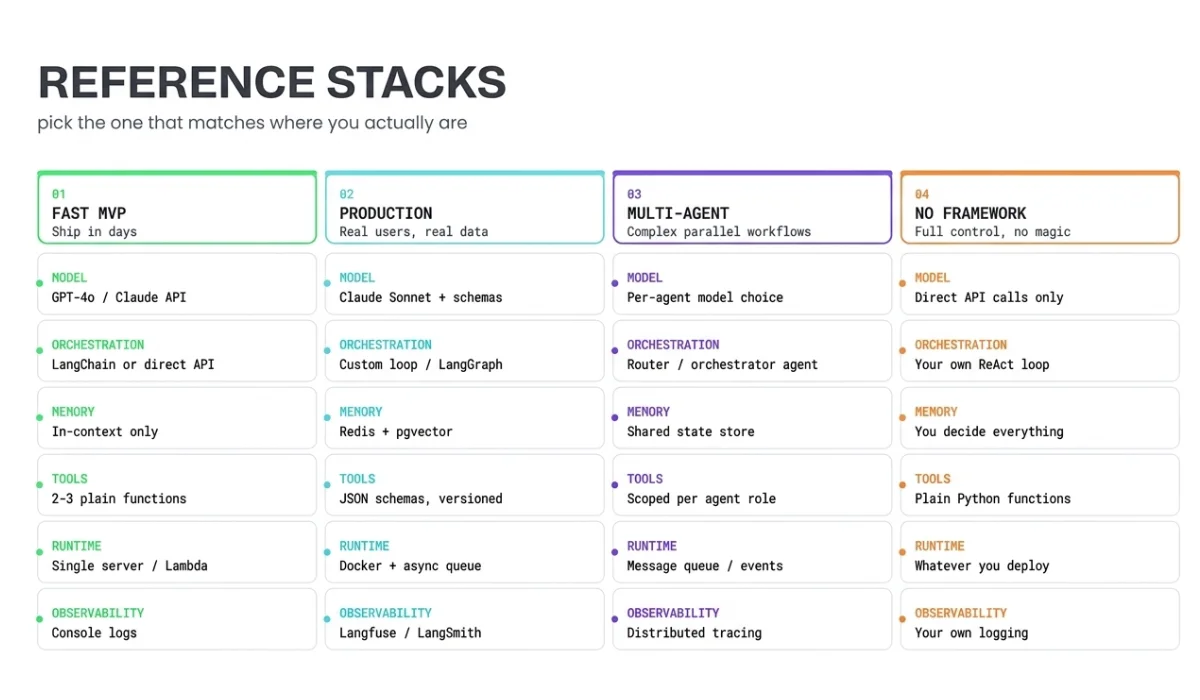
Stack 1: Ship in days (MVP / internal tool)
- Model: Claude or GPT-4o via API
- Orchestration: Direct API calls or LangChain with a simple ReAct loop
- Memory: In-context only, just pass the conversation history each time
- Tools: 2–3 plain functions
- Runtime: A single server or serverless function
- Observability: Console logs, basic try/catch
Why this works: minimal surface area. Fewer things to break. You’ll find out fast whether the agent is actually useful before you over-invest.
Why it breaks down: no persistence, limited context, hard to debug at volume.
Stack 2: Production-ready (real users, real data)
- Model: Claude Sonnet or GPT-4o with explicit tool call schemas
- Orchestration: Custom loop or LangGraph with proper state management
- Memory: Redis for session state, pgvector or Pinecone for retrieval (if you actually need it)
- Tools: Defined with JSON schemas, versioned, with error handling
- Runtime: Containerized, async queue for long tasks
- Observability: Langfuse, LangSmith, or a custom structured logging setup with an evaluation suite
This is where you start caring about reliability more than features. The hard-won lesson is: every layer you add should fix a specific problem you’ve already run into, not one you imagine you might run into.
Stack 3: Multi-agent (complex workflows)
Multiple agents, each with a narrow role, are coordinated by an orchestrator agent or a deterministic router.
When you actually need this:
- A single agent isn’t reliably handling the full task
- Subtasks can run in parallel and meaningfully speed things up
- You need one agent to check another’s work (validation layer)
When you don’t:
- You’re adding multiple agents because it sounds more sophisticated
- A single agent with more tools would do the same thing
Multi-agent is genuinely useful for the right problems. It’s also the easiest way to build something that looks impressive and falls apart in production.
Stack 4: No frameworks, just code
Straight API calls. Custom orchestration loop. Tools as plain functions. No framework in between.
Frameworks are optional. Architecture is not. You still need all five layers; frameworks just give you someone else’s implementation of some of them.
How to Choose the Right Stack for AI Agent Development

Use this decision logic:
- Still figuring out if the idea works? Stack 1. Don’t debate frameworks, don’t set up vector databases, don’t think about scaling. Validate first.
- Real users depending on it? Stack 2. Add observability, persistence, and error handling before you have problems, not after. This is the mistake everyone makes.
- One agent can’t reliably handle the full task? Stack 3. But only if you’ve actually verified that’s the bottleneck.
- Need full control over every step? Stack 4. Takes more code upfront. Worth it for performance-critical or cost-sensitive systems.
Common Mistakes While Choosing an AI Agent Stack
Overusing frameworks from the start. AI frameworks are useful, but they add abstraction. When something breaks inside a LangChain chain, you are debugging their code, not yours. Start with direct API calls until you understand every step, then add framework abstractions where they save meaningful time.
Adding a vector database too early. A vector database is a retrieval system. If your agent does not have a retrieval problem, it does not need one. Many agents work perfectly well with structured queries to a regular database or with relevant content loaded directly into context.
Ignoring tool design, agents are only as good as their tools. An agent with five well-designed tools outperforms one with twenty poorly-defined ones. Invest time in clear names, clear descriptions, narrow scopes, and consistent return formats.
No failure handling in the orchestration loop. What happens if a tool call times out? What if the model returns malformed JSON? What if the agent loops more than ten times? If you have not answered these questions in code, your agent will fail in production, and you will not know why.
Not testing with real inputs before deploying. Agents behave differently on inputs slightly outside the training distribution. Test with actual user inputs, not idealized examples. Build an evaluation suite before you need it.
Quick Summary
Developers who build working AI agents fastest are not the ones who picked the best framework. They’re the ones who:
- Shipped something minimal and got it in front of users
- Identified specific failure modes
- Added the right layer to fix each one
An agent that works reliably on a simple stack beats a complex stack that breaks in weird ways every time.
Start with a model, a loop, and two or three tools. Log everything from day one. Ship it. Then add what you actually need.
FAQs
1.What is an AI agent development stack?
An AI agent development stack is the set of technologies used to build and run an agent, including the model, orchestration logic, memory, tools, and infrastructure. It defines how the agent reasons, interacts with systems, maintains context, and operates reliably in real-world environments beyond simple text generation.
2. What components are required to build an AI agent?
An AI agent requires a foundation model for reasoning, an orchestration layer to manage logic and workflows, a memory system for context retention, a tool layer for external actions, and a runtime environment for execution. Together, these components enable the agent to perform multi-step tasks autonomously and consistently.
3. Which tools and frameworks should I use to build AI agents?
The choice depends on your use case. Frameworks like LangChain or AutoGen help with orchestration, while APIs from OpenAI or Anthropic provide models. Many teams start with frameworks for speed, then move to custom setups for better control and scalability.
4. Do I need a vector database or a memory layer for my AI agent?
You need a memory layer only if your agent must retain or retrieve information beyond a single interaction. For simple tasks, a prompt context is enough. For knowledge retrieval, personalization, or long workflows, a vector database enables efficient storage and semantic search across large datasets.
5. What is the best architecture or stack for building production-ready AI agents?
A production-ready stack combines a reliable model, structured orchestration, a scalable memory system, well-defined tools, and robust infrastructure with monitoring. The best architecture is not the most complex, but the one that balances simplicity, control, and reliability for your specific use case and scale requirements.