Softude

To build a knowledge base chatbot for your company, start by collecting, cleaning up, and structuring your internal documents. Choose whether you want to use a no-code platform, a cloud AI builder, or open-source tools to build the AI chatbot.
Key highlights
- RAG is generally the better choice for developing a knowledge base AI chatbot than fine-tuning.
- You can connect multiple company data sources.
- Employees should only receive answers based on files they already have permission to access.
- Keep the chatbot’s knowledge base up to date to prevent hallucinations and wrong answers.
- Test your internal AI chatbot before making it available to employees.
What is an internal knowledge base AI chatbot?

An internal knowledge base chatbot is an AI assistant that lets employees ask questions in plain language and get answers drawn from company documents. Ask “What’s our travel reimbursement limit?” and it returns a direct answer with a link to the policy. It acts as an AI knowledge base for company information, making approved internal content easier to find and use.
An internal chatbot differs from a customer support bot in three ways. It reads private, often sensitive content. It serves users with different access rights. And it connects to internal systems such as HR, ERP, and ticketing tools. These requirements make permission-aware retrieval and secure access central to enterprise AI search.
Not sure a chatbot is the right fit? Learn how to choose between AI agents, RAG, and chatbots.
How does an AI chatbot work with internal company documents?
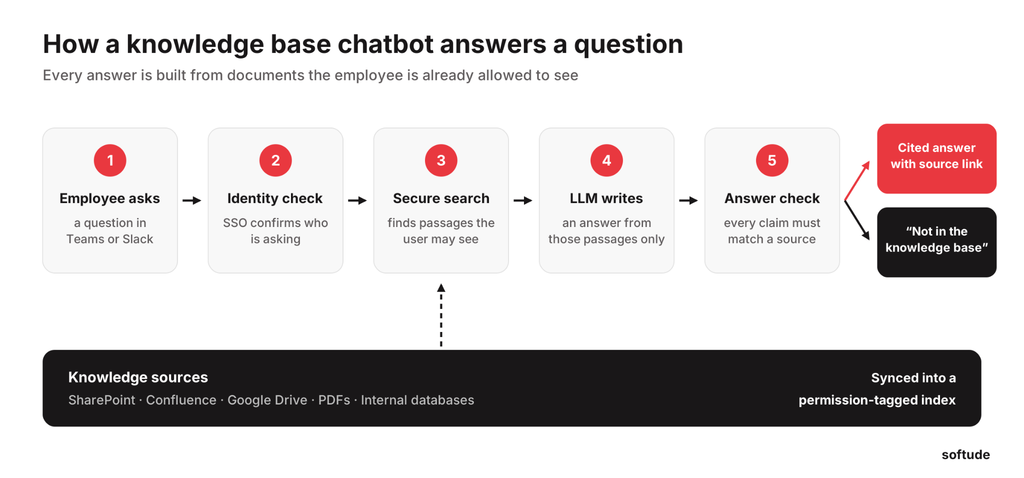
The AI chatbot searches your documents every time an employee asks a question. It finds the passages most relevant to the question that the employee is allowed to see, sends them to a large language model (LLM) along with the question, and the model writes an answer based only on those passages, with citations.
This approach is called retrieval-augmented generation (RAG). A chatbot built on this method is commonly called a RAG chatbot. It has two practical benefits:
- Updates are fast. Edit a policy, and the next answer reflects it once the index syncs, with no model retraining. This is one reason RAG is generally a better fit than fine-tuning when a knowledge base changes frequently.
- Answers are traceable. Every response links to a source the employee can check.
What is the best way to build a knowledge base chatbot for a company?
The best method for internal AI chatbot development depends on how much control you need over data, permissions, and integrations. No-code platforms launch fastest, cloud AI builders balance speed with control, and open-source tools give full control in exchange for more engineering.
All three chatbot development methods run on the same RAG foundation. The best AI knowledge base chatbot for internal teams is the one that connects to their existing sources, respects access permissions, and fits their security and deployment requirements.
| Approach | Examples | Best for | Watch out for |
| No-code / all-in-one platforms | Microsoft Copilot Studio, no-code chatbot builders | One team, standard sources, a pilot in weeks | Limited control over retrieval, permission depth, and data location; per-user pricing |
| Cloud AI builders | Amazon Bedrock Knowledge Bases, Microsoft Foundry with Azure AI Search, Google Vertex AI Search | Companies standardized on one cloud that want managed retrieval plus a custom app | Ties you to one cloud; you still build the interface, integrations, and testing |
| Open-source / workflow tools | LangChain, LlamaIndex, Haystack; n8n, Flowise, Dify; Weaviate, Pinecone, or pgvector | Full control, on-premises hosting, unusual sources or workflows | Your team owns security, scaling, monitoring, and upgrades |
Cloud builders have closed much of the gap. In June 2026, AWS made its fully managed knowledge base generally available, with native connectors for SharePoint, Confluence, Google Drive, OneDrive, and S3, plus document permission support. Managed connectors still don’t cover every legacy system or custom permission model.
Mid-size and large companies should use a mixed approach to build a knowledge base chatbot. Use cloud builder to manage retrieval and custom code for permissions, integrations, and answer checks. This can support broader AI knowledge management without requiring every part of the system to be built from scratch.
What should the knowledge base AI chatbot do?
A knowledge base AI chatbot should answer in plain language, cite the source document, sync with tools like SharePoint and Google Drive, and have a fallback when the answer isn’t in the documents.
Most chatbot build options cover these basic functionalities. They differ on the enterprise functions that decide whether the chatbot can roll out across the whole company.
| Functionality | No-code platform | Cloud AI builder | Custom build |
| Cited answers from company documents | ✓ | ✓ | ✓ |
| Sync with SharePoint, Confluence, Google Drive | ✓ | ✓ | ✓ |
| Document-level permissions across all your systems | Partial | Partial | ✓ |
| Connection to legacy systems and internal databases | ✗ | Partial | ✓ |
| Live answers from HR, ERP, or CRM records | Partial | Partial | ✓ |
| Actions like raising a ticket or updating a record | Partial | Partial | ✓ |
| Answer checks and confidence thresholds you set | Partial | Partial | ✓ |
| Your choice of model, hosting, and data location | ✗ | Partial | ✓ |
A company-wide knowledge base AI assistant usually needs functions that only a custom build fully controls:
- permissions that hold across every system
- live data from business applications
- answer checks matched to your risk level
Softude combines custom RAG chatbot development with integration and security work to ensure your enterprise AI chatbot fits your systems instead of the other way around.
For a global automotive OEM supplier, we built a multilingual conversational AI assistant trained on its HR data and integrated it with its HR management system. The assistant answers in more than 50 languages, including English and Hindi, so employees across plants and regions get consistent policy answers in their own language. It delivered 98% instant query resolution, a 72% reduction in HR workload, and a 34% improvement in employee experience.
How do you build a knowledge base AI chatbot?
To build an AI chatbot, pick one department with a frequent, document-based question load, prove accuracy there, then add sources and users in stages. Indexing the whole company on day one usually means months of cleaning up wrong answers.
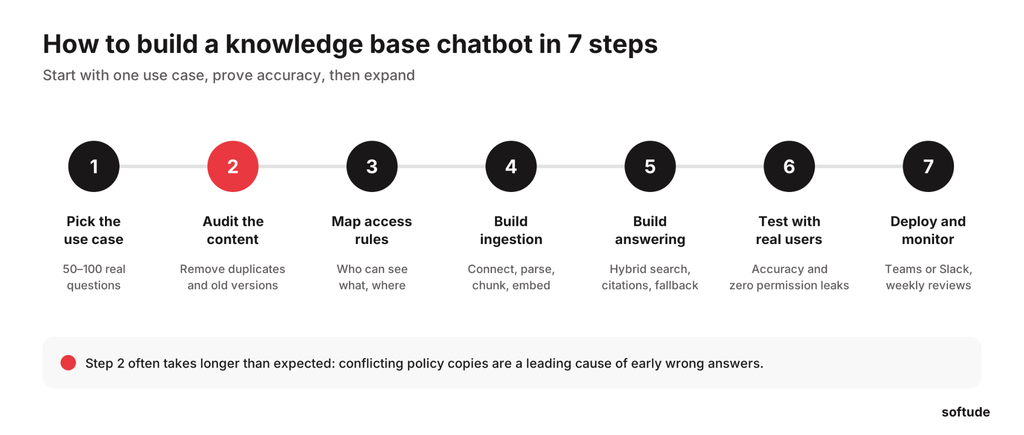
- Pick the use case. Choose frequent, document-based questions, such as HR policies, IT how-tos, or SOPs. Write down 50 to 100 real ones; they become your test set.
- Audit the content. Remove duplicates, outdated versions, and drafts. Assign an owner to each source.
- Map access rules. Document who can see what in each system and how user identities match across them.
- Build the ingestion pipeline. Connect each data source to pull its documents and access permissions. Use parsers to extract the content, split documents into smaller chunks based on their headings, and convert those chunks into embeddings. Store the embeddings in a vector database such as Pinecone, Weaviate, or pgvector, along with metadata such as the source, last-updated date, and user access permissions.
- Build retrieval and answering. Use hybrid search, which combines keyword and vector search, so exact terms like part numbers and acronyms aren’t missed. Add a reranker, prompts that require citations, and a fallback when nothing relevant is found.
- Test with real users. Run the question set, then pilot with a small group.
- Deploy and monitor. Launch in Teams, Slack, or the intranet, review unanswered questions weekly, and expand gradually.
An internal AI chatbot is only as accurate as the documents it reads. Clean, owned, current content improves answers more than any model upgrade.
For the wider delivery process, follow this step-by-step AI chatbot development guide.
Which documents and data sources can you connect?
You can connect almost any source that contains text and offers an API or export. The effort depends less on file type and more on structure, permissions, and how often the content changes.
This also answers a common implementation question: can a chatbot answer from SharePoint and Confluence? Yes, provided the connectors can retrieve the content and sync the relevant page- or document-level permissions.
| Source | What to plan for |
| PDFs | Text PDFs parse easily; scanned PDFs need OCR; tables need extra care |
| Excel | Split by sheet with headers repeated; large data tables are better queried live |
| SharePoint, OneDrive, Google Drive | Item-level permissions and sharing links must sync |
| Confluence | Page restrictions are inherited from parent pages |
| Internal databases | Query live through a tool call instead of copying rows into the index |
| Business apps (CRM, ERP, HRMS, ticketing) | Connect through APIs for live records like leave balances or ticket status |
Personal or fast-changing data, like a leave balance, should come live from the system of record.
How do you secure an internal knowledge base chatbot?

Secure the chatbot the same way you secure the source systems. It should never show employees anything they couldn’t open themselves, and every question, answer, and source should be logged. Permission-aware retrieval is essential: the chatbot must apply the user’s access rights before retrieving content, not simply rely on the language model to avoid restricted information.
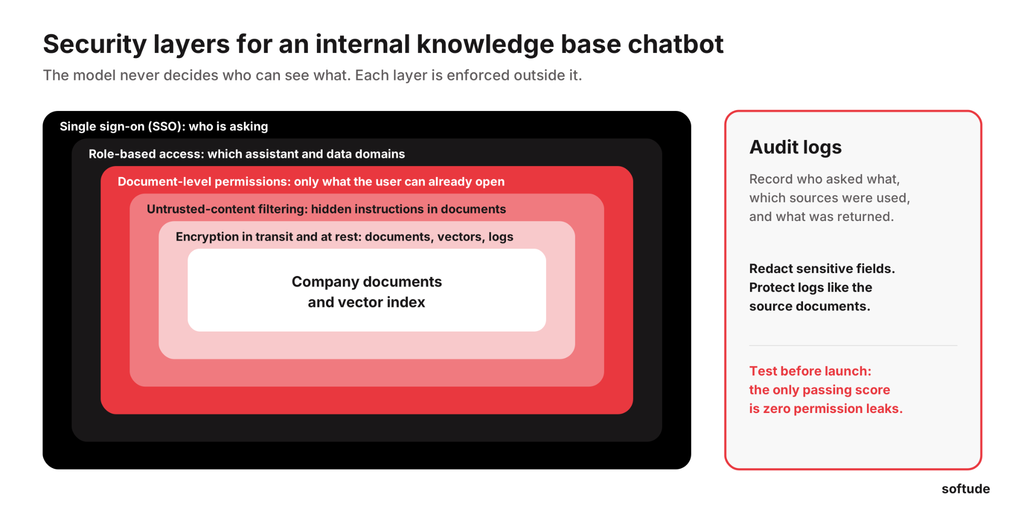
- Authentication. Use single sign-on through Entra ID, Okta, or Google Workspace so the chatbot always knows who is asking.
- Role-based access control (RBAC). Decide who can use which assistant and which data domains, such as HR, finance, or legal.
- Document-level permissions. Tag every chunk with the users and groups allowed to see it, and filter search by the asker’s groups before the model sees anything. Recheck cited sources live to catch permission changes made since the last sync.
- Encryption. Encrypt documents, vectors, and logs in transit and at rest.
- Audit logs. Record who asked what, which sources were used, and what was returned, with sensitive fields redacted.
- Data privacy. Confirm your model provider doesn’t train on your prompts or documents, mask personal data the chatbot doesn’t need, and align with HIPAA, SOC 2, or your industry’s rules.
Two risks are specific to knowledge base chatbots. A document can carry hidden instructions that the model reads as commands, known as indirect prompt injection. And embeddings can leak information, because text can sometimes be reconstructed from them.
How do you prevent hallucinations and inaccurate answers in a knowledge base chatbot?
To keep a knowledge base chatbot accurate, ground every answer in retrieved sources, fix retrieval before tuning prompts, keep content current, and let the chatbot say “I don’t know” when the evidence is weak. Most wrong answers come from retrieving the wrong passage or a correct passage that’s out of date.
- Source citations. Require a citation for each claim and show the source’s last-updated date.
- Retrieval quality. Use hybrid search, reranking, and structure-aware chunks. If the right passage isn’t retrieved, no prompt can rescue the answer.
- Document freshness. Sync changes often, remove deleted files, and favor the newer version when documents conflict.
- Confidence thresholds. When relevance scores fall below a set level, skip generation instead of guessing.
- Fallback mechanisms. Tell the user the answer isn’t in the knowledge base, point to the owning team, or open a ticket.
How do you test and evaluate the chatbot before deployment?

Test the chatbot with real employee questions and check three things: did it find the right document, was the answer correct, and did it respect permissions?
- Build an evaluation set of 100 to 200 real questions, each with the expected source and answer.
- Score retrieval and answer accuracy separately, so you know which part to fix.
- Run permission tests with accounts from different groups. The only passing score is zero leaks.
- Pilot with 20 to 50 users, collect feedback, and review failed questions weekly.
How much does it cost to build an internal knowledge base chatbot?
The cost depends on the number of sources, integration complexity, permission requirements, deployment model, and expected usage. A focused internal knowledge base chatbot typically costs $12,000 to $120,000+.
An enterprise rollout across several systems with strict permissions typically costs more.
| Cost driver | What pushes it up |
| Development | More use cases, custom interface, workflow actions |
| Integrations | Each added source, complex permissions, legacy systems |
| Infrastructure | Index size, hosting choice, GPUs for self-hosted models |
| Model usage | Number of users and questions, answer length, model tier |
| Ongoing maintenance | Connector updates, monitoring, re-testing, support |
For internal tools, integrations and permissions usually drive the AI chatbot development budget more than model usage. Plan roughly 15 to 25 percent of the build cost each year for maintenance.
Should you build a custom chatbot or use an existing platform?
Buy a platform when most of your content sits in one ecosystem, and you need general search across it. Build custom when you need tighter control over security, data location, sources, answer format, or workflows. Many companies end up using both.
| Factor | Existing platform (e.g., Microsoft 365 Copilot, Glean) | Custom build |
| Time to launch | Weeks | A few months |
| Upfront cost | Low | Higher |
| Ongoing cost | Per-user licenses that grow with headcount | Usage and maintenance |
| Sources | Strongest inside its own ecosystem | Any source, including legacy and on-premises |
| Permissions | Follows platform rules, with limited control | Designed around your access model |
| Model and data location | Set by the vendor | Your choice, including on-premises |
| Workflows | Mostly question and answer | Can trigger actions in HR, ERP, or ticketing systems |
Choose a chatbot builder if documents live mainly in one suite and the vendor’s hosting meets your policies.
Choose custom knowledge base chatbot development if your company documents live across several systems, content can’t leave your infrastructure, or the assistant must work inside business applications.
How Softude can help
Softude designs, builds, and supports enterprise knowledge assistants that answer from approved company content, follow existing access rules, and work inside the systems employees already use. Our AI engineers work with our cloud and cybersecurity teams, so retrieval, security, and integration are engineered together.
Our teams help with:
- Use-case prioritization and content readiness assessment
- Custom RAG architecture with permission-aware retrieval
- Multilingual assistants for global and distributed workforces
- Hallucination controls, evaluation, and integration with Teams, Slack, SharePoint, ERP, and HRMS
- Cloud, on-premises, or hybrid deployment under CMMI Level 5 and ISO 27001 processes
If you’re planning an internal assistant on your own documents, explore our AI chatbot development services to scope the right build path with our team.
FAQs
Can a knowledge base chatbot automatically update its answers when company documents change?
Yes, if the ingestion pipeline syncs changes. Connectors detect new, edited, and deleted files and re-index them, often within minutes, with a nightly check catching anything missed. The model needs no retraining.
What happens when the answer isn’t available in the company’s knowledge base?
A well-built chatbot says so plainly instead of guessing. It can point the employee to the team that owns the topic, open a support ticket, or log the question as a content gap for the knowledge owner to fill.
How many company documents can an AI knowledge base chatbot handle?
Vector databases handle millions of chunks, so volume is rarely the limit. Ingestion time, source-system rate limits, and content quality matter more.
Can an internal AI chatbot be deployed inside Microsoft Teams or Slack?
Yes. The chatbot can run as a Teams or Slack app using employees’ existing single sign-on identity, with answers and source links appearing right in chat.
How do you prevent an internal AI chatbot from accessing documents a user isn’t authorized to see?
Sync each document’s permissions into the index and filter every search by the user’s identity and groups before the model sees any content. Recheck cited sources against the live system before answering, and test with restricted accounts before launch.