Softude
Is your AI agent not behaving the way you expected? It worked perfectly in the demo, so what changed?
Many developers get stuck at this exact stage. You build an agent, test it in a controlled setup, and once it seems to work, you deploy it. But the story changes in the production. Outputs become inconsistent. Decisions feel unreliable. Costs and latency increase.
This doesn’t happen because the model failed. It happens because production environments expose gaps in the agent’s design.
In this blog, we are exposing those common AI agent development mistakes and how to avoid them.
The 10 Most Common AI Agent Development Mistakes
1. Treating Agents as Prompt-Based Systems Instead of Stateful Systems
Many teams start building agents the same way they build chatbots: write a good prompt, pass it to the model, and get an answer back. This works fine for single-turn interactions. But agents aren’t chatbots.
An agent operates over multiple steps. It needs to remember what it did two steps ago. It needs to know whether a previous tool call succeeded or failed. It needs context, and that context changes as the agent works through a task.
When you treat an agent like a stateless prompt system, you get agents that forget what they were doing, repeat themselves, contradict earlier decisions, or lose track of the user’s original goal.
How to avoid it: Design your agents with an explicit state model from day one. Think about what information the agent needs to carry between steps: the task goal, the steps completed so far, the tool results, and any errors that occurred. Store that state deliberately, not as a loosely appended conversation history. Build your agent as an execution loop, not as a single-prompt call.
2. Designing One “Do-It-All” Agent Instead of Modular Agents
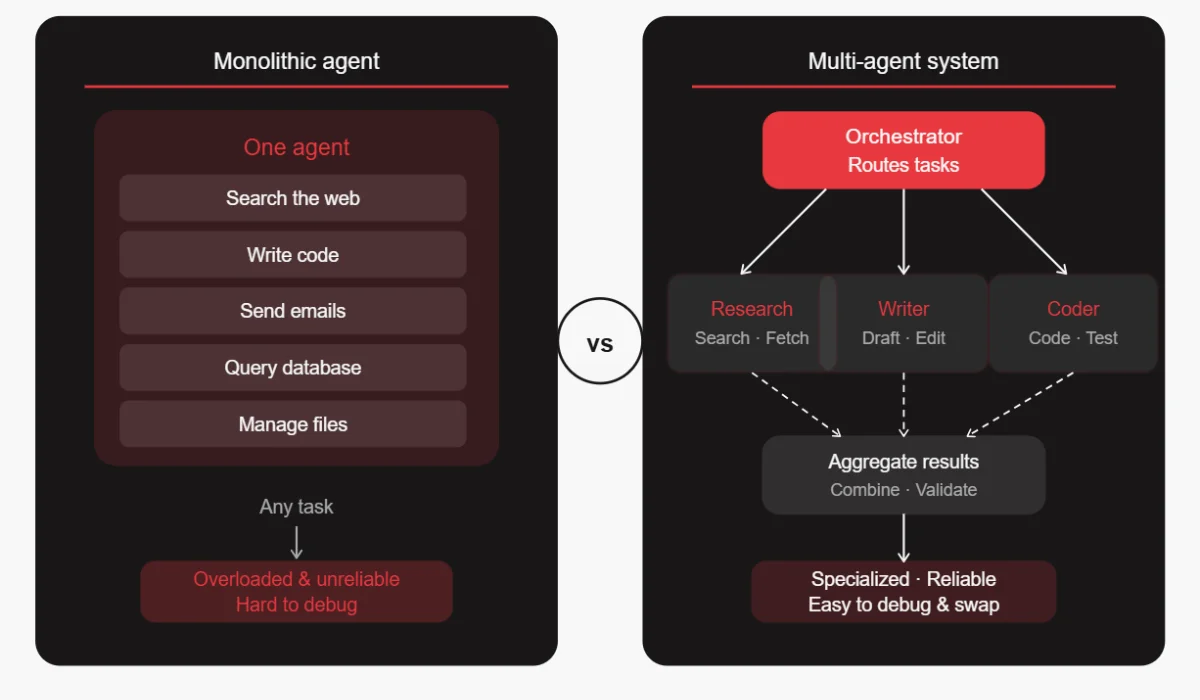
It’s tempting to build one powerful agent that can handle everything. You give it access to every tool, write a massive system prompt describing all its capabilities, and expect it to figure out the rest.
In practice, this creates agents that are unreliable, slow, and hard to debug. The more a single agent has to juggle, the more likely it is to pick the wrong tool, get confused about its role, or fail in ways that are difficult to trace.
How to avoid it: Break your system into specialized agents with narrow, well-defined responsibilities. One agent handles research. Another handles writing. A third handles code. An orchestrator routes tasks to the right agent. This is called a multi-agent architecture, and it dramatically improves reliability. Each agent is easier to test, optimize, and replace when something goes wrong.
3. Ignoring Memory Architecture (Short-Term vs Long-Term)
Memory is one of the most underestimated parts of agent design. Teams often rely entirely on the conversation context window, just appending everything to the prompt. This works for a while, then it breaks.
Context windows have limits. Older information gets dropped. Important details from earlier in a session are lost. The agent starts to seem forgetful or inconsistent, and users lose trust in it.
How to avoid it: Design a layered memory system. Short-term (session) memory holds what’s happening right now, i.e., the current task, recent tool outputs, and intermediate results. Long-term memory (usually a vector database) stores information across sessions, such as past interactions, user preferences, and learned patterns. Structured logs capture what the agent did, when, and why, which is essential for auditing and debugging.
Don’t wait until your context window overflows to think about memory. Build it in from the start.
Also Read: 7 Common AI Model Training Mistakes & How to Fix Them
4. Letting the LLM Control Critical Decisions
LLMs are incredibly capable, but they’re not reliable decision engines. They can hallucinate. They can reason incorrectly. They can confidently produce even wrong answers. Letting the model make high-stakes decisions without guardrails is one of the most dangerous mistakes in agent development.
This shows up in systems where the LLM decides which database to write to, which customer to contact, or whether to approve a transaction. When these decisions go wrong, they go badly wrong.
How to avoid it:
- Use a clear separation between LLM reasoning and deterministic decision logic.
- Let the LLM reason about options and surface recommendations, but move the actual decision logic into code.
- Use explicit rules, validation checks, and business logic that don’t depend on the model.
- Reserve LLM judgment for tasks where nuanced reasoning is genuinely needed, like drafting text or understanding a complex request.
5. Poor Tooling Strategy and Unstructured Tool Access
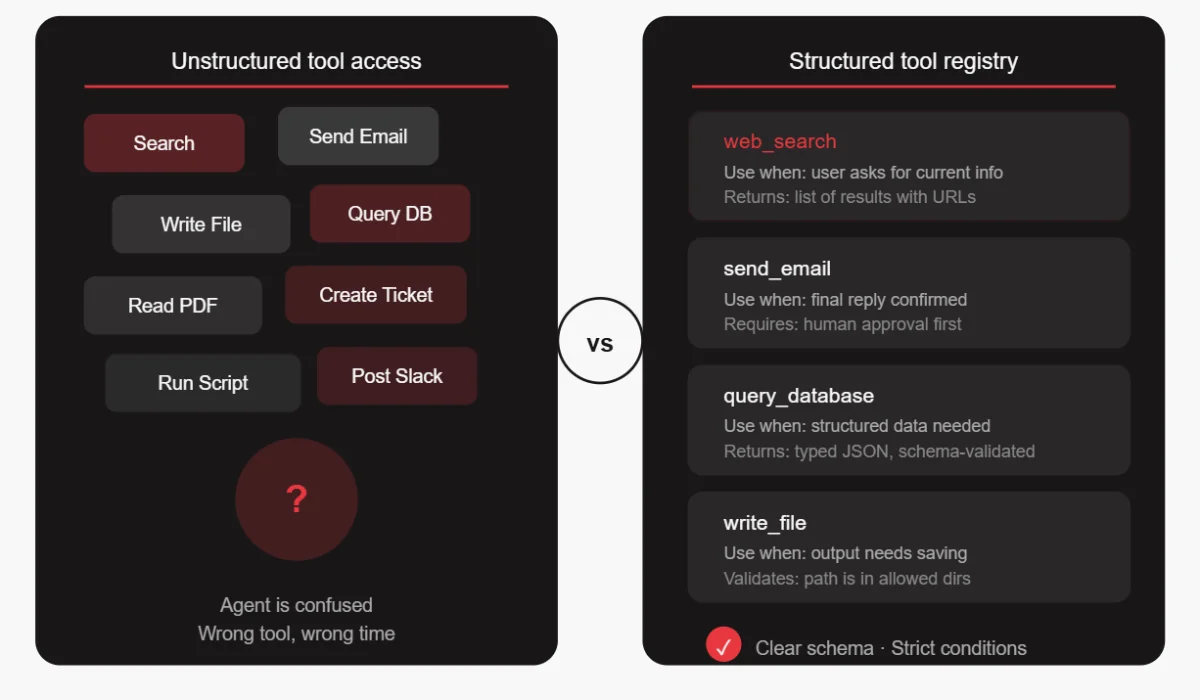
Giving an agent access to 20 different tools sounds powerful, but it will confuse the agent. The model has to figure out which tool to use in each situation, and more choices mean more chances for the wrong choice.
Teams often add tools without thinking carefully about when and how they should be used. The result is agents that call the wrong tool, use tools in the wrong order, or try to use a tool for something it wasn’t designed for.
How to avoid it:
- Define strict schemas for every tool, not just the inputs and outputs, but the exact conditions under which the tool should be used.
- Write clear descriptions that help the model understand when a tool is appropriate and when it’s not.
- Start with fewer, more targeted tools. Add new tools only when there’s a clear need. And test each tool individually before integrating it into the agent system.
6. No Evaluation or Benchmarking Framework
Without a proper AI agent evaluation framework, you have no way of knowing whether your agent is improving or getting worse as you make changes. You can’t catch regressions. You can’t prove the system is reliable enough for production. And when something goes wrong, you have no baseline to compare against.
How to avoid it: Build evaluation into your development process from the beginning.
- Create a library of test scenarios that cover typical, edge, and known-failure cases.
- Define clear scoring criteria for what a good output looks like. Run these evaluations automatically whenever you make changes.
- Track scores over time to see trends. Think of it like unit testing for AI behavior, imperfect, but essential.
7. Ignoring Latency and Cost Until It’s Too Late
A multi-step agent that makes 10 LLM calls per task, uses a large model for every step, and doesn’t cache anything can get very expensive very quickly. Teams often build and test agents without thinking about this, and then get a shock when they try to scale.
Latency is a related problem. Users don’t want to wait 45 seconds for an agent to complete a task. But if you haven’t designed for speed, that’s what you’ll get.
How to avoid it: Think about cost and latency from the design phase. Not every step needs the most powerful (and most expensive) model. Use smaller, faster models for simpler tasks like routing, formatting, or classification, and reserve the large model for steps where reasoning quality matters most. Cache results where possible. Audit your agent’s API usage regularly and look for unnecessary calls. Set cost budgets and alerts early.
8. Lack of Observability and Debugging Capabilities
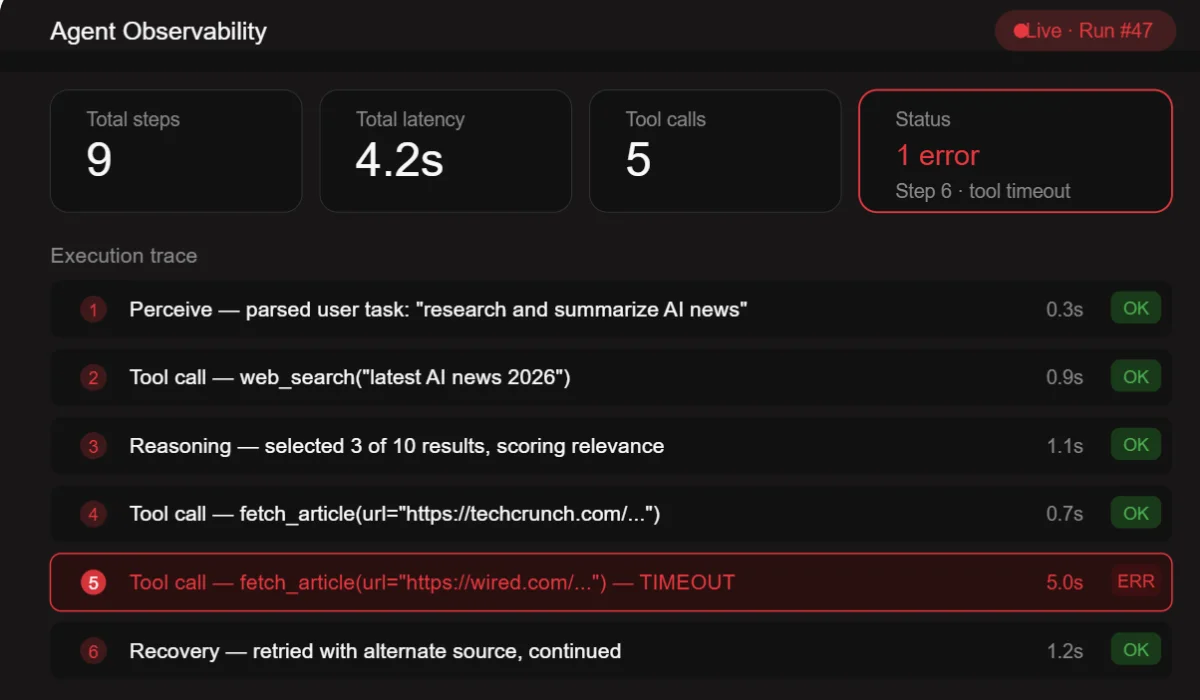
When a traditional software system fails, you look at the logs. When an AI agent fails, you often have… nothing. A final output that’s wrong, and no way to trace why.
This is an enormous problem. Without observability, debugging an agent is guesswork. You can’t tell whether the AI agent failure was in the reasoning, the tool call, the memory retrieval, or the output formatting. You end up re-running the agent and hoping to reproduce the error.
How to avoid it: Instrument your agent like you would instrument any production system. Log every reasoning step, every tool call and its result, every memory retrieval, every decision branch. Use tracing tools designed for LLM systems. There are several good options available today. Build dashboards that let you see what the agent is doing in real time. When something goes wrong, you should be able to replay the agent’s entire thought process step by step.
9. Skipping Guardrails and Safety Mechanisms
Autonomous systems need constraints. An agent that can take actions in the world needs guardrails that prevent it from doing the wrong thing.
Teams often skip this because guardrails feel like friction during development. But without them, agents can cause real damage: sending emails to the wrong recipients, deleting data, running up large bills, or taking actions that can’t be undone.
How to avoid it: Define what the agent is and is not allowed to do before you build anything else. Implement validation layers that verify the agent’s proposed actions before execution. For high-stakes actions, require human approval – this is called a human-in-the-loop pattern. Build in circuit breakers that halt the agent if it starts doing something unexpected. Treat safety as a first-class design requirement, not an afterthought.
10. Building Without a Clear Business Use Case
This is the most foundational mistake of all. Teams get excited about the technology and start building without a clear answer to the question: “What specific problem is this solving, and how will we know if it’s working?”
The result is agents that are technically impressive but don’t actually move any business metric. They get shipped as demos, used briefly, and quietly abandoned.
How to avoid it: Start with the use case, not the technology. Find a workflow that is high-volume, time-consuming, and has clear success metrics. Define what “working” looks like in measurable terms – reduced time, fewer errors, higher throughput. Build the agent to solve that specific problem. Measure your results against your baseline. Expand from there.
How to Build AI Agents the Right Way: A Practical Framework
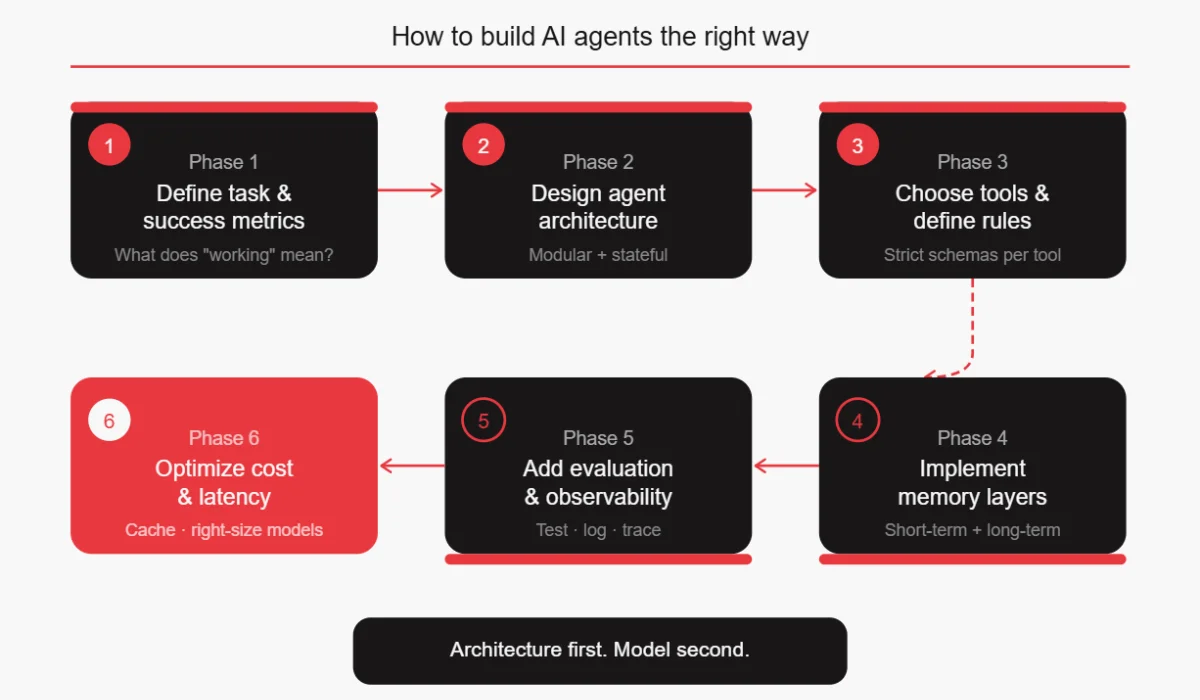
Once you know what to avoid, building agents well becomes much more approachable. Here’s a practical sequence that addresses all the AI agent development mistakes above.
- Define the task and success metrics first. Before writing a single line of code, write down exactly what the agent should do, what inputs it will receive, what outputs it should produce, and how you’ll measure whether it’s working.
- Design agent architecture as modular and stateful. Sketch out your agents before you build them. Decide whether you need one agent or several. Define what state each agent needs to maintain. Draw out the execution loop.
- Choose tools and define usage rules. List the tools your agent needs. Write clear descriptions for each one. Define the conditions under which each tool should be used. Start with fewer tools than you think you need.
- Implement memory layers. Design your short-term session memory, your long-term storage, and your structured logging strategy. Don’t leave this until the context window overflows.
- Add evaluation and observability. Build your test scenarios before you start coding the agent. Set up logging and tracing from day one. Define your quality metrics.
- Optimize for cost and latency. Profile your agent’s API usage. Identify opportunities to use smaller models. Implement caching where appropriate. Set budgets and alerts.
Key Questions to Ask Before Deploying an AI Agent
These questions serve as a pre-deployment checklist. If you can’t answer all of them confidently, you’re not ready to ship.
What decisions should NOT be handled by the LLM? Map out every action your agent can take. For each one, decide whether the decision to take that action can be made by the model, or whether it needs deterministic logic, human approval, or both.
How will the agent remember past interactions? Define your memory architecture. What persists across sessions? What gets cleared? How do you prevent context overflow?
What happens when the agent fails? Define your failure modes. What does the agent do when a tool call fails? When does it get a confusing response? When does it exceed its cost budget? Have answers for these before they happen in production.
How do we measure success reliably? Define your metrics. Not “it seems to work,” but actual measurable numbers – task completion rate, error rate, latency, cost per task, user satisfaction score.
Can this scale cost-effectively? Run the math on your current agent design at 10x, 100x, and 1000x volume. If the numbers don’t work, optimize before you scale.
Conclusion
The LLMs available today are genuinely capable. They can reason well, use tools effectively, and handle complex tasks. But capability alone doesn’t make a reliable system. The architecture around the model determines whether an agent succeeds or fails.
The teams shipping reliable agents today aren’t necessarily using the most powerful models. They’re building systems that account for non-determinism, design for failure, measure rigorously, and iterate based on real data.
Small architectural decisions made early in development have large effects on production reliability. Getting them right from the start is far cheaper than fixing them after the fact.
FAQ
Why do AI agents fail in production?
Most AI agent failures happen due to poor system design, not model limitations. Common reasons include no clear state management (the agent forgets what it was doing), no observability (teams can’t tell why something went wrong), insufficient guardrails (the agent takes actions it shouldn’t), poorly defined tools (the agent uses tools incorrectly), and no proper evaluation framework (the agent was never rigorously tested before shipping). The fix is almost always architectural.
How to test an AI agent?
Testing AI agents requires a different approach than traditional software testing. Start by building a library of test scenarios that cover typical tasks, edge cases, and known failure modes. Define what a “good” output looks like for each scenario and run them automatically whenever you make changes. Track scores over time to catch regressions. Also, test individual tools and components in isolation before testing the full agent. Some teams also use LLM-based evaluators for tasks where human evaluation doesn’t scale.
What tools are used to build AI agents?
Common frameworks for building agents are LangChain, LlamaIndex, CrewAI, AutoGen, and LangGraph. For observability and tracing, tools like LangSmith, Helicone, and Arize Phoenix are popular. For vector databases (long-term memory), Pinecone, Weaviate, Chroma, and pgvector are widely used. For the underlying models, OpenAI, Anthropic, Google, and open-source options like Llama all have strong agent capabilities. The right combination depends on your specific requirements.
How do you reduce hallucinations in agents?
Reduce hallucinations by grounding agents in external data rather than relying on model memory. Validate outputs using code or APIs, enforce structured responses, and shift critical decisions to deterministic logic. Add verification steps for self-checking. Combining retrieval, validation, and control layers significantly improves reliability, though it cannot eliminate hallucinations entirely.